
 GEOS SDK TechDocs|
|
GEOS SDK TechDocs|
|  Cell Library |
  2 Using the Cell Library
Most of the internal structure of a cell file is transparent to the geode which uses it. A geode can, for example, lock a cell with
CellLock()
, specifying the cell's row and column. The cell library will find the appropriate DB item and lock it, returning the locked item's address. For most operations, the geode does not need to know anything about the internal structure of the cell file. However, the internal structure does matter for some purposes. For this reason, we present a quick overview of the structure of a cell file.
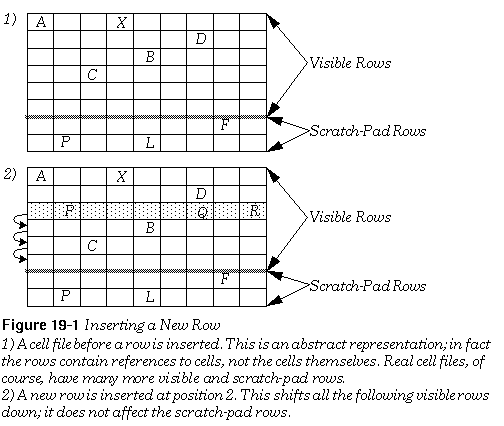
A cell file can contain up to 16,512 rows, numbered from zero to 16,511. Of these 16,512 rows, the last 128 are "scratch-pad" rows. They are intended to be used for holding information or formulae that will not be displayed or associated with a specific cell. The scratch-pad rows are never shifted; if you create a cell in the first scratch-pad row, it will always stay in that row. All other rows are called "visible" rows. Visible rows can be shifted when rows are created or deleted. For example, if you insert a new row 10, all the cells in the old row 10 will now be in row 11, and so on. The first scratch-pad row will be unchanged. Be aware that the database will not delete cells from rows that are shifted off the spreadsheet. For example, if you insert a new row, the last visible row will be shifted off the spreadsheet; the references to cells in that row will be removed, but the cells themselves will stay as DB items in the file. This is not generally a problem, since few cell files will need to use the last visible rows. If you add a row that will cause cells to be shifted off, you should delete those cells first.
The first row has an index number of zero. The last visible row has an index equal to the preprocessor constant LARGEST_VISIBLE_ROW . The first scratch-pad row has an index equal to (LARGEST_VISIBLE_ROW + 1). The last scratch-pad row has an index equal to LARGEST_ROW (which equals (LARGEST_VISIBLE_ROW + 128) or 16,511). The constants are all defined in cell.h .
The basic data unit in a cell file is the
cell
. The cell library treats cells as opaque data structures; their internal structure is entirely up to the geode using them. Cells are stored as ungrouped DB items. This restricts cell size to the size of a DB item; that is, a cell can theoretically be as large as 64K, but in practice should not grow larger than around 8K (and ideally should be under a kilobyte in size). Remember, whenever a DB item is created or resized, pointers to all other items in the group are invalidated. Since cells are ungrouped items, whenever you create or resize a cell, you invalidate any pointers to all other ungrouped items in that VM file. In particular, you invalidate pointers to all other cells in that VM file (even if the cells belong to another cell file in the VM file).
Cells are grouped into
rows
. A row can have up to 256 cells, numbered from zero to 255. Within a row, cells are identified by their column index. The column index can fit into an
unsigned
byte variable. The cell library creates a
column array
for every row which contains cells. The column array contains one entry for each cell in the row. A row often contains just a few widely scattered elements. For this reason, the column array is implemented as a
sparse array
. Each cell in the row has an entry consisting of two parts, namely the cell's column number and its
DBGroupAndItem
structure. The advantage of this arrangement is that the column array need only contain entries for those cells which exist in the row (instead of maintaining entries for the blank spaces between cells). The disadvantage is that when you lock a cell, the cell manager has to make a search through the column array to find its reference; however, this is generally a small cost.
The column arrays themselves belong to
row blocks
. Each row block is an LMem heap stored in the VM file, and each of its column arrays is a chunk in that heap. Row blocks contain up to 32 rows. These rows are sequential; that is, any existing rows from row zero to row 31 will always belong to the same row block, and none of them will ever be in the same row block as row 32. Since the row blocks and column arrays are not kept in DB items, they can be accessed and altered without causing any locked items to move. To keep track of the row blocks, you must have a
CellFunctionParameters
structure for each cell file. That structure need not be kept in the VM file (although it often is); rather, you must pass the address of the structure to any cell library routine you call.
Owing to the structure of a cell file, some actions are faster than others. The essential thing to remember is that cells are grouped together in rows, which are themselves grouped together to form a cell file. This means that you can access several cells belonging to the same row faster than you could access cells belonging to different rows. Similarly, if you insert a cell, it is much more efficient to shift the rest of the row over (which involves accessing only that one row) than to shift the rest of the column down (which involves accessing every visible row). Similarly, you can access groups of cells faster if they belong to the same row block.
GEOS SDK TechDocs|
| Cell Library | 2 Using the Cell Library