For some applications, it is natural to organize data in a two-dimensional array. The classic example of this is the spreadsheet, in which every entry (or cell ) can be uniquely identified by two integers: the cell's row and its column.
The cell library lets you arrange data this way. The cell library saves the cells as DB items in a VM file. It insulates the application from the actual DB mechanism, letting the application behave as if its data is stored in a two-dimensional array. The library also provides routines to sort the cells by row or by column and to apply a routine to every cell in a range of rows and/or columns.
A collection of cells arranged into rows and columns is termed a cell file . Every cell file is contained in a VM file. There is often a one-to-one correspondence between cell files and the VM files which contain them. However, this correspondence is optional. There is nothing to stop an application from maintaining several distinct cell files in a single VM file.
1 Structure and Design
2 Using the Cell Library
2.1 The CellFunctionParameters Structure
2.2 Basic Cell Array Routines
2.3 Actions on a Range of Cells
Most of the internal structure of a cell file is transparent to the geode which uses it. A geode can, for example, lock a cell with
CellLock()
, specifying the cell's row and column. The cell library will find the appropriate DB item and lock it, returning the locked item's address. For most operations, the geode does not need to know anything about the internal structure of the cell file. However, the internal structure does matter for some purposes. For this reason, we present a quick overview of the structure of a cell file.
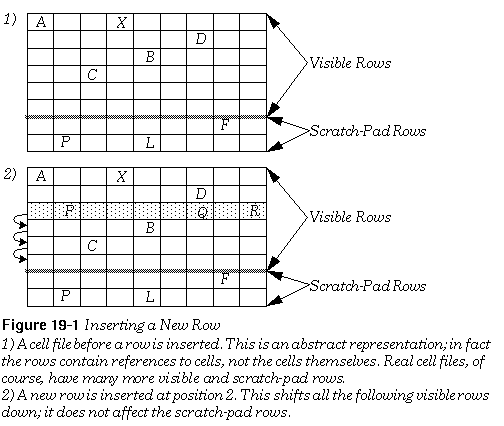
A cell file can contain up to 16,512 rows, numbered from zero to 16,511. Of these 16,512 rows, the last 128 are "scratch-pad" rows. They are intended to be used for holding information or formulae that will not be displayed or associated with a specific cell. The scratch-pad rows are never shifted; if you create a cell in the first scratch-pad row, it will always stay in that row. All other rows are called "visible" rows. Visible rows can be shifted when rows are created or deleted. For example, if you insert a new row 10, all the cells in the old row 10 will now be in row 11, and so on. The first scratch-pad row will be unchanged. Be aware that the database will not delete cells from rows that are shifted off the spreadsheet. For example, if you insert a new row, the last visible row will be shifted off the spreadsheet; the references to cells in that row will be removed, but the cells themselves will stay as DB items in the file. This is not generally a problem, since few cell files will need to use the last visible rows. If you add a row that will cause cells to be shifted off, you should delete those cells first.
The first row has an index number of zero. The last visible row has an index equal to the preprocessor constant LARGEST_VISIBLE_ROW . The first scratch-pad row has an index equal to (LARGEST_VISIBLE_ROW + 1). The last scratch-pad row has an index equal to LARGEST_ROW (which equals (LARGEST_VISIBLE_ROW + 128) or 16,511). The constants are all defined in cell.h .
The basic data unit in a cell file is the
cell
. The cell library treats cells as opaque data structures; their internal structure is entirely up to the geode using them. Cells are stored as ungrouped DB items. This restricts cell size to the size of a DB item; that is, a cell can theoretically be as large as 64K, but in practice should not grow larger than around 8K (and ideally should be under a kilobyte in size). Remember, whenever a DB item is created or resized, pointers to all other items in the group are invalidated. Since cells are ungrouped items, whenever you create or resize a cell, you invalidate any pointers to all other ungrouped items in that VM file. In particular, you invalidate pointers to all other cells in that VM file (even if the cells belong to another cell file in the VM file).
Cells are grouped into
rows
. A row can have up to 256 cells, numbered from zero to 255. Within a row, cells are identified by their column index. The column index can fit into an
unsigned
byte variable. The cell library creates a
column array
for every row which contains cells. The column array contains one entry for each cell in the row. A row often contains just a few widely scattered elements. For this reason, the column array is implemented as a
sparse array
. Each cell in the row has an entry consisting of two parts, namely the cell's column number and its
DBGroupAndItem
structure. The advantage of this arrangement is that the column array need only contain entries for those cells which exist in the row (instead of maintaining entries for the blank spaces between cells). The disadvantage is that when you lock a cell, the cell manager has to make a search through the column array to find its reference; however, this is generally a small cost.
The column arrays themselves belong to
row blocks
. Each row block is an LMem heap stored in the VM file, and each of its column arrays is a chunk in that heap. Row blocks contain up to 32 rows. These rows are sequential; that is, any existing rows from row zero to row 31 will always belong to the same row block, and none of them will ever be in the same row block as row 32. Since the row blocks and column arrays are not kept in DB items, they can be accessed and altered without causing any locked items to move. To keep track of the row blocks, you must have a
CellFunctionParameters
structure for each cell file. That structure need not be kept in the VM file (although it often is); rather, you must pass the address of the structure to any cell library routine you call.
Owing to the structure of a cell file, some actions are faster than others. The essential thing to remember is that cells are grouped together in rows, which are themselves grouped together to form a cell file. This means that you can access several cells belonging to the same row faster than you could access cells belonging to different rows. Similarly, if you insert a cell, it is much more efficient to shift the rest of the row over (which involves accessing only that one row) than to shift the rest of the column down (which involves accessing every visible row). Similarly, you can access groups of cells faster if they belong to the same row block.
The cell library is versatile. The basic cell access routines are very simple, but more advanced utilities give you a wide range of actions. This section will explain the techniques used to set up and use a cell file, as well as the more advanced techniques available.
The CellFunctionParameters Structure
The cell library needs to have certain information about any cell file on which it acts; for example, it needs to know the handles of the VM file and of the row blocks. That information is kept in a
CellFunctionParameters
structure. The geode which uses a cell file is responsible for creating a
CellFunctionParameters
structure. The C definition of the structure is shown below.
Code Display 19-1 CellFunctionParameters
typedef	struct {
	CellFunctionParameterFlags
			CFP_flags;		/* Initialize this to zero. */
	VMFileHandle		CFP_file;		/* The handle of the VM file containing
					 * the cell file. Reinitialize this each
					 * time you open the file. */
	VMBlockHandle		CFP_rowBlocks[N_ROW_BLOCKS];			/* Initialize these to zero. */
} CellFunctionParameters;
In order to create a cell file, you must create a
CellFunctionParameters
structure. Simply allocate the space for the structure and initialize the data fields. When you call a cell library routine, lock the structure on the global heap and pass its address. Geodes will usually allocate a VM block in the same file as the cell file, and use this block to hold the
CellFunctionParameters
structure; this ensures that the structure will be saved along with the cell file. They may often declare this to be the map block, making it easy to locate (see the VM chapter). However, this is entirely at the programmer's discretion. All that the cell library requires is that the structure be locked or fixed in memory every time a cell library routine is called.
The
CellFunctionParameters
structure contains the following fields:
CFP_flags
CellFunctionParameters
structure, thus indicating that the structure ought to be resaved. After you save it, you may clear this bit.
CFP_file
CFP_rowBlocks
One warning: The cell library expects the
CellFunctionParameters
structure to remain motionless for the duration of a call. Therefore, if you allocate it as a DB item in the same VM file as the cell file, you must
not
have the structure be an ungrouped item. Remember, all the cells are ungrouped DB items; allocating or resizing a cell can potentially move any or all of the ungrouped DB items in that file.
CellReplace(), CellLock(), CellLockGetRef(), CellDirty(), CellGetDBItem(), CellGetExtent()
The basic cell routines are simple to use. One argument taken by all of them is the address of the
CellFunctionParameters
structure. As noted, this structure must be locked or fixed in memory for the duration of a function call. You can also access cells in any of the ways you would access a DB item; for example, you can resize a cell with
DBReAlloc()
.
All of the routines use the VM file handle specified in the
CellFunctionParameters
structure.
To create, replace, or free a cell, call the routine
CellReplace()
. This routine takes five arguments:
CellFunctionParameters
structure.
If the cell file already contains a cell with the specified coordinates,
CellReplace()
will free it.
CellReplace()
will then allocate a new cell and copy the specified data into it. The routine invalidates any existing pointers to ungrouped DB items in the file.
Once you have created a cell, you can lock it with
CellLock()
. This routine takes three arguments: the address of the
CellFunctionParameters
structure, the cell's row, and the cell's column. It locks the cell and returns its address (the assembly version returns the cell's segment address and chunk handle). Remember, the cell is an ungrouped DB item, so its address may change the next time another ungrouped DB item is allocated or resized, even if the cell is locked.
Like all DB items, cells can (under certain circumstances) be moved even while locked. For this reason, a special locking routine is provided, namely
CellLockGetRef()
. This routine is just like
CellLock()
except that it takes one additional argument, namely the address of an optr.
CellLockGetRef
writes the locked item's global memory handle and chunk handle into the optr.
You can translate an optr to a cell into a pointer by calling
CellDeref()
; this is another synonym for
LMemDeref()
, and is identical to it in all respects.
If you change a cell, you must mark it dirty to insure that it will be updated on the disk.
To do this, call the routine
CellDirty()
. This routine takes two arguments, namely the address of the
CellFunctionParameters
structure and the address of the (locked) cell. The routine marks the cell's item block as dirty.
Sometimes you may need to get the DB handles for a cell. For example, you may want to use a DB utility to resize the cell; to do this, you need to know its handles.
For these situations, call the routine
CellGetDBItem()
. The routine takes three arguments: the address of the
CellFunctionParameters
structure, the cell's row, and the cell's column. It returns the cell's
DBGroupAndItem
value. You can pass this value to any of the
DB...Ungrouped()
routines, or you can break this value into its component handles by calling
DBGroupFromGroupAndItem()
or
DBItemFromGroupAndItem()
.
If you want to find out the bounds of an existing cell file, call the routine
CellGetExtent()
. This routine takes two arguments: the address of the
CellFunctionParameters
, and the address of a
RangeEnumParams
structure. For the purposes of this routine, only one of its fields matters, namely the field
REP_bounds
. This field is itself a structure of type
Rectangle
, whose structure is shown below in Rectangle.
CellGetExtent()
writes the bounds of the utilized section of the cell file in the
REP_bounds
field. The index of the first row which contains a cell will be written in the rectangle's
R_top
field; the index of the last row will be written in
R_bottom
; the index of the first column will be written in
R_left
; and the index of the last column will be written in
R_right
. If the cell file contains no cells, all four fields will be set to
-1.
typedef	struct {
	sword		R_left;		/* Index of first column written here. */
	sword		R_top;		/* Index of first row written here. */
	sword		R_right;		/* Index of last column written here. */
	sword		R_bottom;		/* Index of last row written here. */
} Rectangle;
RangeExists(), RangeInsert(), RangeEnum(), RangeSort(), RangeInsertParams
The cell library provides a number of routines which act on a range of cells. All of these routines take the address of a
CellFunctionParameters
structure as an argument. Many of these routines also take the address of a special parameter structure; for example,
RangeInsert()
takes the address of a
RangeInsertParams
structure. In these cases, the structure should be in locked or fixed memory. If the routine might allocate or resize cells, the structure must not be in an ungrouped DB item.
You may want to find out if there are any cells in a specified section of the cell file. To do this, call the routine
RangeExists()
. This routine takes five arguments:
CellFunctionParameters
structureIf any cells exist in that section, the routine returns true (i.e. non-zero). Otherwise, it returns false .
You may wish to insert several cells at once. For this reason, the cell library provides the routine
RangeInsert()
. This routine does not actually allocate cells; instead, it shifts existing cells to make room for new ones. You specify a section of the cell file to shift. Any cells in that section will be shifted over; the caller specifies whether they should be shifted horizontally or vertically.
The routine takes two arguments, namely the address of the
CellFunctionParameters
and the address of a
RangeInsertParams
structure. It does not return anything. The definition of the
RangeInsertParams
structure is shown in The RangeInsertParams and Point structures. The calling geode should allocate it and initialize it before calling
RangeInsert()
.
Code Display 19-3 The RangeInsertParams and Point structures
typedef	struct {		/* defined in cell.h */
	Rectangle			RIP_bounds;		/* Range of cells to shift */
	Point			RIP_delta;		/* Specify which way to shift */
	CellFunctionParameters			*RIP_cfp;
} RangeInsertParams;
typedef	struct {		/* defined in graphics.h */
	sword		P_x;	/* Distance to shift horizontally */
	sword		P_y;	/* Distance to shift vertically */
} Point;
The
RangeInsertParams
structure has three fields. The calling geode should initialize the fields to determine the behavior of
RangeInsert()
:
_bounds
RIP_delta
; this shifts more cells, and so on, to the edge of the visible portion of the cell file. The field is a
Rectangle
structure. To insert an entire row (which is much faster than inserting a partial row), set
RIP_bounds.R_left = 0
and
RIP_bounds.R_right =
LARGEST_COLUMN
.
_delta
Point
structure (see The RangeInsertParams and Point structures). If the range of cells is to be shifted horizontally,
RIP_delta.P_x
should specify how far the cells should be shifted to the right, and
RIP_delta.P_y
should be zero. If the cells are to be shifted vertically,
RIP_delta.P_y
should specify how far the cells should be shifted down, and
RIP_delta.P_x
should be zero.
_cfp
CellFunctionParameters
structure. You don't have to initialize this; the routine will do so automatically.
You may need to perform a certain function on every one of a range of cells. For this purpose, the cell library provides the routine
RangeEnum()
. This routine lets you specify a range of cells and a callback routine; the routine will be called on each cell in that range.
You can sort a range of cells, by row or by column, based on any criteria you choose. Use the routine
RangeSort()
. This routine uses a QuickSort algorithm to sort the cells specified. You supply a pointer to a callback routine which is used to compare cells.