
 GEOS SDK TechDocs|
|
GEOS SDK TechDocs|
|  8 Graphics Strings |
  8.2 Special Drawing Commands
 GrCreateGString(), GrDestroyGString(), GrLoadGString(), GrEditGString(), GrCopyGString(), GrGetGStringHandle(), GrSetVMFile()
GStrings may reside an a number of types of memory areas. Depending on the GString's storage, you will have to do different things to load it. One common case we have already discussed to some extent is when the GString is part of a visual moniker. In this case, the gstring will be stored in the
gstring
field of the
@visMoniker
's implied structure. In this case the UI will do all loading and drawing of the GString.
The GString data itself consists of a string of byte-length number values. The graphics system knows how to parse these numbers to determine the intended drawing commands. You need not know the details of the format used--there are routines by which you may build and alter GStrings using common kernel graphics routines; however, macros and constants have been set up so that you may work with the data directly.
GString data may be stored in any of the following structures (corresponding to the values of the
GStringType
enumerated type):
Note that a GString stored in a Stream, VM block, or in memory referenced only by a pointer is not quite ready to be drawn, only GStrings stored in a chunk may be drawn. Fortunately there is a routine which can load any type of GString into local memory so that it may be drawn.
If you are editing or creating the GString dynamically, it will have a GState associated with it. Any drawing commands made using this GState will be appended to the GString. This GState will not be stored with the GString; it is instead stored with the other GStates. You may destroy the GState when done editing, and hook up a new one if starting some other edit; this will not affect the GString's storage.
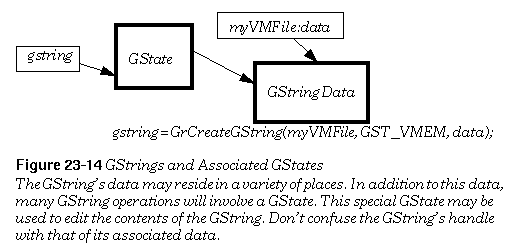
To dynamically create an empty GString, call the
GrCreateGString()
routine. You must decide where you want the GString to be stored--either in a chunk, a VM block, or a stream. If you wish to store the GString in a chunk or VM block, a memory unit of the appropriate type will be allocated for you. This routines will return the GState by which the GString may be edited and the chunk or VM block created.
The
GrDestroyGString()
routine allows you to free up the GState handle associated with your GString You may also destroy the GString's data if you wish; specify exactly what you want to destroy by means of the
GStringKillType
argument. In addition, you may destroy another GState. You must pass the global handle of the GString to destroy--this will be the handle returned by
GrCreateGString()
,
GrEditGString()
, or
GrLoadGString()
.
The
GrLoadGString()
command loads a GString into a global memory block so that it may be drawn. Actually, it doesn't load the entire GString into memory, but does initialize the data structure so that it may be referenced through the global memory handle which the routine returns.
The
GrEditGString()
command is very much like
GrCreateGString()
, except that instead of creating a new GString, it allows you to dynamically edit an existing GString. This command loads a VM-based GString into a special data structure. Like
GrCreateGString()
, it returns a GState to which you may make drawing commands. You may insert or delete drawing commands while in this mode, all using kernel drawing routines. For more information about using this routine, see Editing GStrings Dynamically.
The
GrCopyGString()
command copies the contents of one GString to another. At first you might think that you could do this by allocating the target GString with
GrCreateGString()
, then drawing the source GString to the provided GState. However, the GState may only have one GString associated with it, whether that GString is being used as a source or target.
To find the handle of the GString data associated with a GState, call
GrGetGStringHandle()
. To update the VM file associated with a GString (perhaps after calling
VMSave()
), use
GrSetVMFile()
.
GEOS SDK TechDocs|
| 8 Graphics Strings | 8.2 Special Drawing Commands