
 GEOS SDK TechDocs|
|
GEOS SDK TechDocs|
|  2 Graphics Goals |
  4 How To Use Graphics
 The graphics system involves many pieces of GEOS working together to turn an application's UI and graphics commands into drawings on a display.
The graphics portion of the kernel automatically makes any requested transformations to the coordinate space dealing with scaling, rotation, etc. It transforms complicated drawing commands into simpler ones supported by the video drivers.
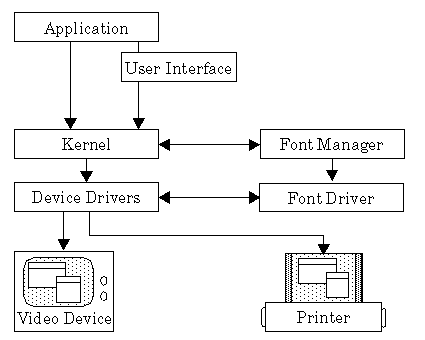
The video driver can render these simplified commands directly on the device. The video driver checks for collisions, making sure that if whatever is being drawn coincides with the mouse pointer, the mouse pointer will be drawn on top. The video driver does clipping so a geode doesn't draw outside its window.
Commands and information flow in this manner from application to the Video Device, though information also flows in the opposite direction, so that the kernel can get information about the display device's resolution, size, and capabilities.
If the geode is going to draw text, the graphics system makes calls to the font manager. If the requested font isn't already in memory, the font manager loads it. The font manager then makes calls to the individual font driver for information about specific characters.
GEOS SDK TechDocs|
| 2 Graphics Goals | 4 How To Use Graphics