
 GEOS SDK TechDocs|
|
GEOS SDK TechDocs|
|  3.3 Mix Mode |
  3.5 Line-Specific Attributes
 GrSetAreaMaskSys(), GrSetAreaMaskCustom(), GrGetAreaMask(), GrSetLineMaskSys(), GrSetLineMaskCustom(), GrGetLineMask(), GrSetTextMaskSys(), GrSetTextMaskCustom(), GrGetTextMask()
Masks are the pixellated equivalent of hatch patterns. Instead of specifying a set of dashed lines, the program uses an 8x8 bitmap array which will be tiled. The graphics system provides a number of standard mask patterns, including 65 percentage masks (for achieving, e.g., a 50% fill) and several shape patterns. It's simple to ask that the inverse of a system pattern be used instead of the pattern itself. The program may also specify and use custom draw masks by setting an 8 byte array.
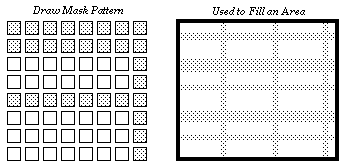
The
GrSetAreaMaskSys()
routine specifies one of the standard draw masks to use when filling areas.
GrSetAreaMaskCustom()
allows the program to specify a custom mask by passing a pointer to an 8 byte. Each byte of the buffer represents one row of the mask; the rows are ordered from top to bottom.
GrGetAreaMask()
returns the current area mask.
There are similar routines which set the drawing mask to use when drawing lines:
GrSetLineMaskSys()
,
GrSetLineMaskCustom()
, and
GrGetLineMask()
.
To work with the drawing mask used when rendering text, use
GrSetTextMaskSys()
,
GrSetTextMaskCustom()
, and
GrGetTextMask()
.
For the most part, it's probably not a good idea to use masks when drawing text, since the pixelated nature of the mask is likely to make the text less legible. However, when drawing text in very large point sizes, draw masks are probably fine.
Since several of the masks are associated with a fill percentage, some programmers may confuse masks with gray-scale fills. Grays should be implemented with colors, by drawing in a color with equal red, green, and blue values.
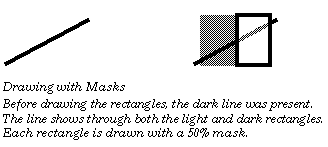
When you are building a document image, do not use draw masks just to achieve a lighter color. That is, if you are not making use of the "mask" property of draw masks (i.e., you don't care if you can see through it), then you should just specify a lighter color and let the kernel do the dithering. This is important especially because drawing masks in PostScript takes much longer than drawing a bitmap of the same size.
When constructing or interpreting system draw mask values, first remember that if the SDM_INVERSE flag is set, then the inverse of the mask will be used instead of the mask itself. The remaining bits should be a
SystemDrawMask
value, a value between zero and SDM_0. Draw mask values between zero and 24 are various graphic draw mask patterns. Values between 25 and 89 are percentage fill masks, 89 corresponding to the empty fill and 25 to a 100% fill. Several SDM_... constants have been set up with the more commonly used system draw patterns. For a list of constants, see the Routines manual.
GEOS SDK TechDocs|
| 3.3 Mix Mode | 3.5 Line-Specific Attributes