
 GEOS SDK TechDocs|
|
GEOS SDK TechDocs|
|  2.2 Lines |
  2.4 Ellipses
 GrDrawRect(), GrDrawRectTo(), GrFillRect(), GrFillRectTo()
Rectangles are defined by four coordinates which can be thought of as either defining the rectangle's left, top, right, and bottom bounds or as specifying two opposite corners of the rectangle.
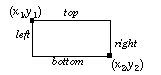
GrDrawRect()
draws the outline of a rectangle using the passed coordinates.
GrDrawRectTo()
draws the outline of a rectangle using the current pen position as one of the defining points; the pen position is unchanged by this operation. These functions draw the rectangle outline using the current line attributes.
GrFillRect()
draws a filled rectangle defined by the passed coordinates.
GrFillRectTo()
fills a rectangle of which the pen position is one corner.
GrFillRect()
and
GrFillRectTo()
use the GState's area attributes. They do not draw a border around the rectangle; if you want a bordered rectangle, call
GrFillRect()
and follow it with
GrDrawRect()
. Note that if the order of these operations if reversed, the fill may obscure the draw.
GEOS SDK TechDocs|
| 2.2 Lines | 2.4 Ellipses