
 GEOS SDK TechDocs|
|
GEOS SDK TechDocs|
|  2.5 Elliptical Arcs |
  2.7 Rounded Rectangles
 GrDrawArc3Point(), GrDrawArc3PointTo(), GrFillArc3Point(), GrFillArc3PointTo(), GrDrawRelArc3PointTo()
The graphics system allows another way to specify arcs. Given two endpoints and one arbitrary point, there is a unique circular arc which has those endpoints and passes through that arbitrary point. The closer the arbitrary point is to the line connecting the endpoints, the shallower the described arc.
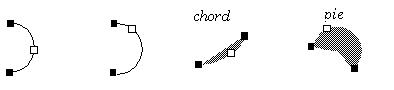
GrDrawArc3Point()
draws the three-point arc corresponding to the passed points. The second endpoint passed becomes the new pen position.
GrDrawArc3PointTo()
draws a three-point arc using the present pen position as one of the endpoints; the other endpoint becomes the new pen position.
GrFillArc3Point()
fills a three-point arc.
GrFillArc3PointTo()
fills an arc that has the present pen position as an endpoint.
The
GrDrawRelArc3PointTo()
routine draws a three-point arc where the pen position is the first point and the other two points are specified as offsets from that position. This routine takes WWFixed coordinates for precision drawing.
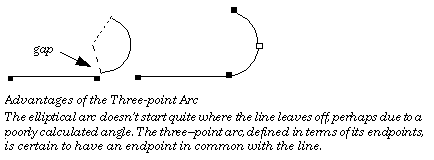
One time when programmers might especially want to use three point arcs is in the construction of paths. An important consideration when constructing paths is making sure that the various segments of the path are connected; that is, that they share endpoints. When specifying elliptical arcs, the endpoints are never explicitly defined. Thus, it is ambiguous in some cases whether an arc is supposed to be connected to something else. Because three-point arcs include their endpoints with their definition, there is no such ambiguity.
GEOS SDK TechDocs|
| 2.5 Elliptical Arcs | 2.7 Rounded Rectangles