Some applications need to keep track of many small pieces of data. For example, a database might use thousands of items of data, each of them only a paragraph long; in a spreadsheet, the data size might be only a few bytes. GEOS provides a Database (DB) library to make it easy to keep track of such data and store them conveniently in a GEOS Virtual Memory file.
The DB library manages Local Memory heaps in a VM file and uses these heaps to store items. It lets the geode associate items into groups; these groups can grow indefinitely, unlike LMem heaps.
1 Design Philosophy
2 Database Structure
2.1 DB Items
2.2 DB Groups
2.3 Allocating Groups and Items
2.4 Ungrouped DB Items
2.5 The DB Map Item
3 Using Database Routines
3.1 General Rules to Follow
3.2 Allocating and Freeing Groups
3.3 Allocating and Freeing Items
3.4 Accessing DB Items
3.5 Resizing DB Items
3.6 Setting and Using the Map Item
3.7 Routines for Ungrouped Items
3.8 Other DB Utilities
A database manager should be flexible, allowing applications to store a variety of data items. It should be efficient, with minimal overhead in data-access time as well as in memory usage (whether in main memory or in disk space). Ideally, it ought to insulate applications from the details of memory allocation and data referencing. The GEOS database manager meets all of these requirements and several more:
The Database routines use a Database Manager to access and create DB items. These items are stored in a standard VM file. This chapter will sometimes refer to a "Database File"; this simply means a VM file which contains DB items.
The basic unit of data is the item . Items are simply chunks in special LMem heaps which are managed by the DB Manager; these heaps are called item blocks . You will not need to use any of the LMem routines; the DB manager will create and destroy LMem heaps as necessary and will call the appropriate routines to lock DB items when needed.
Each DB item in a DB file is uniquely identified by the combination of a group-handle and an item-handle . Note that these handles are not the same as the item's LMem Heap handle and its chunk handle. You will not generally need to use the item's heap and chunk handles; the DB routines store and use these automatically. However, you can retrieve them if necessary (for example, if you want to use an LMem utility on a DB item).
The DB Manager does not keep track of allocated items. Once you allocate an item, you must store the group- and item-handles. If you lose them, the item will remain in the file, but you will not be able to find it again.
Since DB items are chunks, their addresses are somewhat volatile. If you allocate an item in a group, other items in that group may move even if they are locked. (See the Local Memory chapter.)
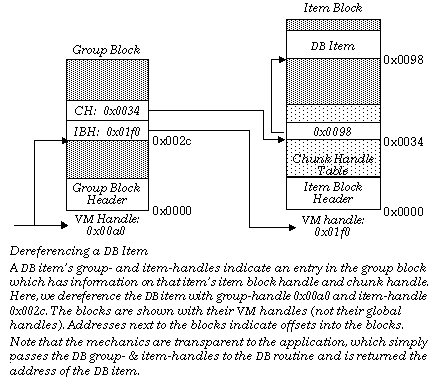
Each DB item is a member of a DB group. The DB group is a collection of VM blocks; the group comprises a single group block and zero or more item blocks.
The group block contains information about each item block and each item in the group. For each item block, it records the VM handle of the block and the number of DB items in the block. For each DB item, it records the VM handle of the item block in which the item is stored and the item's chunk handle within that item block. The item blocks are simply LMem heaps with a little extra information in the headers.
The item's group-handle is simply the VM handle of the group block for that group. The item's item-handle is an offset into the group block; the information about the item is stored at that offset. When you lock an item, the DB manager looks in that location in the group block and reads the handles of the item block and the chunk associated with that item; it then locks the item block and returns the address of the chunk. (In assembly code, it returns the segment address and the chunk handle.) The relationship between the different blocks and handles is shown in the figure below.
Whenever you access a DB item, the DB manager has to lock the block. If you access several items in a row, the overall access time is better if they belong to the same group since only one group block will need to be swapped in to memory. The items may also be in the same item-block since each item block contains items from only one group; again, this improves access time. Thus, it is a good idea to distribute items in groups according to the way they will be accessed; for example, an address-book database might group entries according to the first letter of the last name, thus speeding up alphabetical access. If you have no logical way to group items, see Ungrouped DB Items.
When you need a new DB group, call the DB routine
DBGroupAlloc()
(see Allocating and Freeing Groups). This routine creates and initializes a DB group block.
When you allocate a DB item, you specify which group the item will go in. The DB manager sets up an entry for the item in the group block. It then decides which item block to put the item in. It tries to keep all the item blocks at the right size to optimize speed. If all of the group's item blocks are too full, it allocates a new item block and allocates the new item in that block. In either case, it returns the new item's item-handle.
Once an item has been allocated, it will stay in the same item block (and have the same chunk handle) until it is freed or resized. If it is resized to a larger size, it may be moved to a different item block belonging to the same group.
Sometimes there is no natural way to group DB items. For these situations, the DB manager allows you to allocate ungrouped items. These items actually belong to special groups which are automatically allocated by the DB manager. The DB manager tries to keep these groups at the right size for optimum efficiency.
When you allocate an ungrouped item, the DB manager allocates an item in one of its "ungrouped groups." If there are no such groups or if all of these groups have too many items already, the DB manager allocates a new "ungrouped" group.
For practical purposes, ungrouped DB items have a single, dword-sized handle. This "handle" is of type
DBGroupAndItem
. The upper word of this is the handle of the ungrouped group for this item; the lower word is the item's item-handle within that group. There are special versions of most database routines for use with ungrouped items. These routines take a
DBGroupAndItem
argument instead of separate group-handle and item-handle arguments. These routines are discussed in Routines for Ungrouped Items. This section also describes macros which combine a group-handle and item-handle into a
DBGroupAndItem
and which break a
DBGroupAndItem
into its constituent parts.
You can designate a "map item" for a VM file with the routine
DBSetMap()
. You can recover the map item's group and handle at will by calling
DBGetMap()
. This is entirely separate from the file's map block; indeed, a VM file can have both a map block and a map item, and they may be set, locked, and changed independently.
The map routines are described in detail in Setting and Using the Map Item.
GEOS provides a wide range of routines for working with databases. The routines all require that the calling thread have the VM file open. Most routines have to be passed the VMFileHandle of the appropriate VM file.
Almost all DB routines come in two forms. The standard form takes, among its arguments, the group-handle and the item-handle of an item to be affected. The other form is designed for use with "ungrouped" items. This form takes, as an argument, the item's
DBGroupAndItem
structure.
In addition to the routines listed here, all of the VM chain routines can work on DB items. Simply cast the
DBGroupAndItem
structure to type
VMChain
, and pass it in place of the chain argument(s). (
VMCopyVMChain()
will allocate the duplicate item as "ungrouped.") For more information about
VMChain
routines, see the VM chapter.
Setting and Using the Map Item
There are certain rules of "memory etiquette" you should follow when using DB files. For the most part, these rules are the same as the general rules of memory etiquette.
First and foremost, try to keep as few blocks locked as possible, and keep them locked for as short a time as possible. You should not usually need to keep more than one item locked at a time. If you need another item, unlock the first one first, even if they're in the same item block. (This will cost very little time since the item block is unlikely to be swapped to disk right away.) The main reason you should have two or more items open at once is if you are directly comparing them or copying data from one to another. In this case, you should unlock each item as soon as you're done with it.
Remember that items are implemented as chunks in LMem heaps. This means, for example, that when you allocate an item (or expand an existing one), the heap it resides in (i.e. the item block) may be compacted or moved on the global heap (even if it is locked). This will invalidate all pointers to items in that item block. As a general rule, you should not allocate (or expand) items if you have any items from that group locked. Do not allocate "ungrouped" items if you have any items from any of the "ungrouped" groups locked. If you must keep an item locked, keep track of the item's memory block and chunk handle so you can use
DBDeref()
to get the address again.
Finally, try to keep the blocks small. Most of this is done for you. When you allocate an item, the DB manager will put it in an uncrowded item block. If all item blocks are too large, it will allocate a new one. However, you should keep items from getting too large. If individual items get into the multi-kilobyte range, you should consider storing them a different way; for example, you could make each f the larger items a VM block or a VM chain.
DBGroupAlloc(), DBGroupFree()
You can improve DB access time by assigning items to groups such that items from the same group will generally be accessed together. This will cut down on the number of times group and item blocks will have to be swapped into memory.
To allocate a group, call
DBGroupAlloc()
. This routine takes one argument, namely the handle of the VM file in which to create the group. It allocates the group and returns the group-handle (i.e., the VM handle of the group block). If it is unable to allocate the group, it will return a null handle.
If you are done with a DB group, call
DBGroupFree()
. This routine frees the group's group block and all of its item blocks. Any attached global memory blocks will also be freed. Naturally, all items in the group will be freed as well. You can free a group even if some of its items are locked; those items will be freed immediately.
DBAlloc(), DBFree()
To allocate a DB item, call
DBAlloc()
. This routine takes three arguments: the handle of the VM file, the DB Group in which to allocate the item, and the size of the item (in bytes). The routine will allocate an item in one of that group's item blocks (allocating a new item block if necessary); it returns the new item's item-handle.
Remember that when you allocate a DB item, the DB manager allocates a chunk in an LMem heap (the item block). This can cause the item block to be compacted or resized; this will invalidate all pointers to items in that block. For this reason, you should not allocate items in a group while other items in that group are locked. Similarly, you should not allocate "ungrouped" items while any "ungrouped" items are locked. Instead, unlock the items, allocate the new one, and then lock the items again.
When you are done with an item, free it with
DBFree()
. This routine takes three arguments: the file handle, the group-handle, and the item-handle. It frees the item, making appropriate changes in the group block. If the item was the only one in its item block, that item block will be freed as well.
DBFree()
does not return anything. Note that you should never free a locked item since the item-block's reference-count will not be decremented (and the block will never be unlocked). Always unlock an item before freeing it. (You need not, however, unlock items before freeing their
group
; when a group is freed, all of its items are automatically freed, whether they are locked or not.)
DBLock(), DBLockGetRef(), DBDeref(), DBUnlock(), DBDirty()
To access a database item, lock it with
DBLock()
. This routine takes three arguments: the handle of the VM file, the item's group-handle, and the item's item-handle. The routine locks the item-block on the global heap and returns the address of the element. If the block is already locked (generally because another item in the item-block is locked), it increments the lock count.
In some circumstances it might be useful to know the global handle of the locked item-block and the chunk handle of the item.
For example, if you want to set up an item as a chunk array, you will need this information. For this reason, the library provides the routine
DBLockGetRef()
. This routine is just like
DBLock()
, except that it takes one additional argument: the address of a variable of type optr.
DBLockItemGetRef()
writes global and chunk handles to the optr and returns the address of the locked DB item. You can now use any of the LMem routines on the item, simply by passing the optr.
Note that the memory block attached to the item block may change each time the block is locked unless you have instructed the VM manager to preserve the handle (see the VM chapter). The chunk handle will not change, even if the file is closed and reopened, unless the chunk is resized larger. (When an item is resized larger, the DB manager may choose to move the item to a different item-block, thus changing its chunk handle.) In general, if you will need this information you should get it each time you lock the item instead of trying to preserve it from one lock to the next.
If you have an optr to a
locked
DB item, you can translate it to an address with the routine
DBDeref()
. This is useful if you have to keep one item locked while allocating or expanding another item in that group. Since the locked item might move as a result of the allocation, you can get the new address with
DBDeref()
. In general, however, you should unlock all items in a group before allocating or resizing one there. Note that
DBDeref
is simply a synonym for
LMemDeref()
; the two routines are exactly the same.
When you are done accessing an item, call
DBUnlock()
. This routine takes one argument, the address of a locked item. The routine decrements the reference count of the item's item-block. If the reference count reaches zero, the routine unlocks the block. Thus, if you lock two different items in an item block, you should unlock each item separately. As noted above, you should always unlock an item before freeing it.
If you change a DB item, you should mark the item's block as
dirty
by calling
DBDirty()
. This ensures that the changes will be copied to the disk the next time the file is saved or updated. The routine takes one argument, a pointer to an address in an item block (generally the address of an item). It will dirty the item-block containing that item. As with VM blocks, you must dirty the item
before
you unlock it, as the memory manager can discard any clean block from memory as soon as it is unlocked.
DBReAlloc(), DBInsertAt(), DBDeleteAt()
Database items may be resized after allocation. They may be expanded either by having bytes added to the end or by having bytes inserted at a specified offset within the item. Similarly, items may be contracted by having bytes truncated or by having bytes deleted from the middle of the item. When an item is resized, the DB manager automatically dirties the item block (or blocks) affected.
As noted above, when an item is expanded, its item block can be compacted or moved on the item heap (even if the item is locked). Thus, pointers to all items in that item block may be invalidated, even if they are locked. For that reason, you should unlock all items in the group before expanding any of them. If you must leave an item locked, be sure to get its new address with
DBDeref()
. If you
decrease
an item's size, the item-block is guaranteed not to move or be compacted. Thus, you can safely contract locked items (or items in the same block as locked items).
To set a new size for an item, call
DBReAlloc()
. This routine takes four arguments: the file handle, the group-handle, the item-handle, and the new size (in bytes). If the new size is smaller than the old, bytes will be truncated from the end of the item. If the new size is larger than the old, bytes will be added to the end of the item; these bytes will not be zero-initialized.
To insert bytes in the middle of an item, call the routine
DBInsertAt()
. This routine takes five arguments: the file handle, the group-handle, the item-handle, the offset (within the item) at which to insert the bytes, and the number of bytes to insert. The new bytes will be inserted beginning at that offset; they will be zero-initialized. Thus, if you insert ten bytes beginning at offset 35, the new bytes will be at offsets 35-44; the byte which had been at offset 35 will be moved to offset 45. To insert bytes at the beginning of an item, pass an offset of zero.
To delete bytes from the middle of an item, call
DBDeleteAt()
. This routine takes five arguments: the file handle, the group-handle, the item-handle, the offset (within the item) of the first byte to delete, and the number of bytes to delete. The routine does not return anything.
DBSetMap(), DBGetMap(), DBLockMap()
A VM file can have a
map block
and a
map item
. The map can be retrieved with a special-purpose routine, even if you don't know its handle (or handles); thus, the map usually keeps track of the handles for the rest of the file. The map can be retrieved even if the file is closed and re-opened. To set a map block, use the routine
VMSetMap()
(see the VM chapter). To set a map item, use the routine
DBSetMap()
.
DBSetMap()
takes three arguments: the file handle, the item's group-handle, and the item's item-handle. The routine sets the file's map item to the DB item specified. A VM file can have both a map block and a map item; these are set independently.
Once you have set a map item, you can retrieve its handles with the command
DBGetMap()
. This routine takes one argument, namely the file's handle. It returns a
DBGroupAndItem
value containing the map item's handles. You can break this value into its constituent handles with
DBGroupFromGroupAndItem()
and
DBItemFromGroupAndItem()
(see Routines for Ungrouped Items).
You can also lock the map directly without knowing its handles by calling the routine
DBLockMap()
. This routine takes one argument, namely the file handle. It locks the map item and returns the map's address. When you are done with the map item, unlock it normally with a call to
DBUnlock()
.
DBAllocUngrouped(), DBFreeUngrouped(), DBLockUngrouped(), DBLockGetRefUngrouped(), DBReAllocUngrouped(), DBInsertAtUngrouped(), DBDeleteAtUngrouped(), DBSetMapUngrouped()
Special routines are provided for working with ungrouped items. These routines are very similar to their standard counterparts. The routine
DBAllocUngrouped()
allocates an ungrouped item. It takes two arguments, the file handle and the size of the item to allocate. The DB manager allocates the item in one of the "ungrouped" groups and returns a
DBGroupAndItem
value containing the group-handle and item-handle. You can break this value into its components by calling the macros described in Routines for Ungrouped Items, or you can pass this value directly to the other "ungrouped" routines.
The rest of the routines listed above are exactly the same as their counterparts with one exception: whereas their counterparts take, among their arguments, the item's group-handle and item-handle, the ungrouped routines take a
DBGroupAndItem
value. Each routine's other arguments are unchanged, as is the return value.
These routines are provided as a convenience. If you allocate an ungrouped item, you are perfectly free to break the
DBGroupAndItem
value into its component handles, and pass those handles to the standard DB routines. Conversely, if you allocate a normal "grouped" item, you are free to combine the two handles into a
DBGroupAndItem
token and pass that token to the "ungrouped" routines.
DBCopyDBItem(), DBCopyDBItemUngrouped(), DBGroupFromGroupAndItem(), DBItemFromGroupAndItem(), DBCombineGroupAndItem()
You can duplicate a DB item with the routine
DBCopyDBItem()
. This routine takes five arguments: the handle of the source file, the source item's group-handle, the source item's item-handle, the handle of the destination file (which may be the same as the source file), and the handle of the destination group. The routine will allocate a new item in the specified file and group. It will then lock both items and copy the data from the source item to the destination. Finally, it will unlock both items and return the item-handle of the duplicate item.
The routine
DBCopyDBItemUngrouped()
is the same as
DBCopyDBItem()
, except that it allocates an ungrouped item in the specified file. It is passed the source file handle, the
DBGroupAndItem
value for the source item, and the destination file handle. It allocates an ungrouped item and returns its
DBGroupAndItem
value.
Remember, if you are allocating the duplicate in the same group as the source, you should only call this routine when the source item is unlocked (since its item-block may be compacted when the new item is allocated). If the destination is in another block, the source item may be locked or unlocked at your preference. If it is locked when you call
DBCopyDBItem()
, it will be locked when the routine returns.
All of the VM chain utilities work on DB items as well as VM chains. The routines are described in the VM chapter. To use a VM chain routine, pass the item's DBGroupAndItem value. For example,
VMCopyVMChain()
will allocate an "ungrouped" duplicate item in the specified file and return its
DBGroupAndItem
value.
To build a
DBGroupAndItem
value from the group-handle and item-handle, use the macro
DBCombineGroupAndItem()
. This macro takes the two handles and returns a
DBGroupAndItem
value. To extract the component handles from a
DBGroupAndItem
value, use the macros
DBGroupFromGroupAndItem()
and
DBItemFromGroupAndItem()
. These macros are passed a
DBGroupAndItem
value and return the appropriate component.