
 GEOS SDK TechDocs|
|
GEOS SDK TechDocs|
|  4.5 Custom Scrolling Behavior |
  4.7 Table Headings
 MSG_TABLE_CHAR_LOCATE, MSG_TABLE_STRING_LOCATE
The Table object may wish to respond to searches on its data. For this purpose, the Table object is designed to interact with a
LocatorClass
object; the Locator object is a UI object that the user uses to initiate searches on the Table. The Locator object implements this search by sending the Table object one of two messages. You must intercept these messages to provide searching behavior.
TableClass
provides no default searching behavior.
The Locator object is discussed in detail in LocatorClass; however, some background on how the Locator works is illustrative to providing the Table`s searching behavior.
The Locator object can be in one of two modes: index mode or text search mode. The Locator object will appear and act differently depending on which mode it is in.
When the Locator object is in index mode, it takes the form of an action bar, shown below.
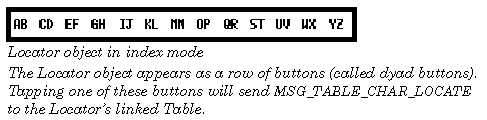
Tapping on one of the Locator's dyad buttons (`AB', `EF', etc.) will send the Table object
MSG_TABLE_CHAR_LOCATE
, passing it the letter to search. Repeatedly clicking on a dyad button will cycle through the two letters to perform the search. For example, clicking once on the `AB' dyad button will send the Table
MSG_TABLE_CHAR_LOCATE
with the character `A.' Clicking again on that button will send the Table
MSG_TABLE_CHAR_LOCATE
with the character `B.' Clicking yet again on that button will send the Table
MSG_TABLE_CHAR_LOCATE
with the character `C.'
If you have a Locator linked to your Table, you will want to intercept
MSG_TABLE_CHAR_LOCATE
to make sure that you can implement searching behavior in index mode.
When the Locator object is in text search mode, the action bar "morphs" into a text search entry field shown below.

Entering text into the text search field of the Locator will send the linked Table object
MSG_TABLE_STRING_LOCATE
after each keystroke, passing it the current contents of the text entry field. You will want to intercept this message to provide your searching method for when the Locator object is in text mode.
You may find it convenient to write a generic searching routine that your message handlers for both
MSG_TABLE_CHAR_LOCATE
and
MSG_TABLE_STRING_LOCATE
may call. This searching routine will likely want to perform a case-insensitive search on your Table. You may want to use a routine such as
LocalCmpStringsNoCase()
for this purpose. Note that you must still provide separate message handlers for each of these messages even if you provide a generic searching routine.
Code Display 5-6 Implementing a Search
/* This code implements a single character search initiated by a Locator object. */
@method MyTableClass, MSG_TABLE_CHAR_LOCATE
{
    char *data;			/* Pointer to the table data array. */
    word index =0;			/* A linear index into the Table data array. */
    /* We'll want to send MSG_TABLE_SET_CURRENT_SELECTION, so we'll want
     * to pass a TableCellRange.
     */
    TableCellRange	selection;
Boolean searchResult; /* Reports the success or failure of the search. */
    /* We initialize the selection to start searching from the beginning of the
     * Table. */
    selection.TCR_start.TCL_row					= 0;
    selection.TCR_start.TCL_column					= 0;
    selection.TCR_end.TCL_row					= 0;
    selection.TCR_end.TCL_column					= 0;
    /* Lock down our data block. */
    MemLock(OptrToHandle(@cellDataArray));
    /* Perform a case-insensitive search on the data in the array. We do this by
     * searching linearly, multiplying by the total number of columns in the
     * Table, so that we only search the first column. (We could have also
     * performed our search cell by cell in a linear fashion; in that case we
     * would not have multiplied the index by TABLE_COLS in the `step' section of
     * the while statement.) The data in this case is assumed to be stored in a      * linear chunk array. */
    do {
	data = ChunkArrayElementToPtr(@cellDataArray, index, 1);
    } while(
	(LocalCmpStringsNoCase(data, searchText, 1)) &&
	((++index * TABLE_COLS) < (TABLE_COLS * TABLEROWS)));
/* We've finished searching; we can free the data block. */
MemUnlock(OptrToHandle(@cellDataArray));
    /* Determine if search found a match. */
    if (index >= (TABLE_COLS * TABLE_ROWS))
    {
	searchResult = TRUE;			/* Indicates no match was found. */
    }
    else
    {
	/* If successful, set selection to "current" index cell. */
	selection->TCR_start.TCL_row 				= index / TABLE_COLS;
	selection->TCR_start.TCL_column 				= index % TABLE_COLS;
	selection->TCR_end.TCL_row				= selection->TCR_start.TCL_row;
	selection->TCR_end.TCL_column				= selection->TCR_start.TCL_column;
@call self::MSG_TABLE_SET_CURRENT_SELECTION(selection);
	searchResult = FALSE;			/* Indicates that we found a match. */
    }
    return(searchResult);				/* We don't call the superclass. Default behavior
				 * is to return TRUE indicating no matches were
				 * found. */
}
Boolean	MSG_TABLE_CHAR_LOCATE(
        char		searchChar);
This message is sent to the
TableClass
object by the Locator object instructs a Locator object (in index mode) to locate the entered character within the
TableClass
object that is in the Locator's LI_
destination
field. It does this by sending the Table object
MSG_TABLE_CHAR_LOCATE
, passing it the search character. You will want to intercept that message within your subclass of
TableClass
to implement your search criteria.
When in index mode, this message is sent with a single index letter (e.g. `A', or `B' in the "AB" dyad) of the tapped dyad button. Repeatedly tapping on a dyad button will cycle through the indexed letters, sending out this message a separate time for each tap (first with `A,' then with `B,' and then with `A' again). For this reason, make sure that code that implements this message is not run under the UI thread. (Doing so may result in bothersome screen "glitches" as the Table scrolls first to the `A' entries, then to the `B' entries, etc.
Source: The Locator object.
Destination: The Locator's linked Table object.
Parameters: searchChar Character to search. Passed from one of the Locator's dyad buttons.
Return: Non-zero if the search failed. Note that if you do not write a search method for
TableClass
, this message will always return non-zero.
Boolean	MSG_TABLE_STRING_LOCATE(
        char		*text);
This message instructs a Locator object (in text mode) to locate the entered string within the
TableClass
object that is in the Locator's LI_
destination
field. It does this by sending the Table object
MSG_TABLE_STRING_LOCATE
, passing it the pointer to the search string. You will want to intercept that message within your subclass of
TableClass
to implement your search criteria.
The Locator object enters text search mode whenever the user types a printable character on the keyboard; in that case, the
locateString
contains the character typed and a search (with this message) is performed. I.e. a search is performed after each successive character is entered. If the search is unsuccessful, the character will not appear.
Source: The Locator object.
Destination: A Locator object.
Parameters:
text
Pointer to the null-terminated search string to pass to
MSG_TABLE_STRING_LOCATE
.
Return: Non-zero if the search failed. Note that if you do not write a search method for TableClass, this message will always return non-zero.
GEOS SDK TechDocs|
| 4.5 Custom Scrolling Behavior | 4.7 Table Headings