
 GEOS SDK TechDocs|
|
GEOS SDK TechDocs|
|  4.7 Table Headings |
  5 TableContentClass
You may wish in exceptional circumstances to display different columns than the ones you statically define using TI_
columnDefinitions
. In that case, you may want to define alternate column definitions and switch which ones you use at appropriate times in your application. There is a fair amount of overhead in doing this yourself--there currently exists no API to take care of this behavior--so you should make sure you want to take that approach.
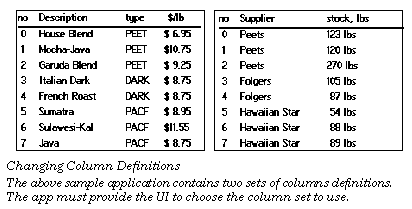
The following steps are recommended to get this behavior:
TI_columnDefinitions
is a chunk handle, it cannot reference chunks outside of the resource.)
columnDefinitions
to the appropriate column definitions in your handler for this message. Also change your index number to indicate the new column definitions being used and the pointer to the chunk array of data.
MSG_TABLE_REDRAW_TABLE
from this handler. This will dispatch
MSG_TABLE_QUERY_DRAW
to each of the affected cells.
MSG_TABLE_QUERY_DRAW
as usual.Code Display 5-8 Dynamically Changing Column Definitions
/* First, make sure you create a message to change the column definitions and an
 * instance field to indicate which column definitions we are using. */
@class MyTableClass, TableClass;
@message void MSG_MY_TABLE_CHANGE_COLUMN_DEFINITIONS(int columnIndex);
    @instance int 			MTI_columnIndex = 0;
    @instance optr			MTI_chunkArray = NullOptr;
@endc;
@classdecl MyTableClass;
/* Define your column definitions. Make sure that each set of column definitions
 * adds up to 240 pixels across. Note that if you want headers for each of these
 * column definitions, you will need to handle that yourself.*/
#define MY_COLUMN_FLAGS (TCF_START_SELECT | TCF_DOUBLE_SELECT | TCF_DRAG_SELECT |
			TCF_HOLD_SELECT | TRIT_CELL )
@chunk TableColumnDefinition ColumnSet1[] = {
    MY_COLUMN_FLAGS, 25,
    MY_COLUMN_FLAGS, 100,
    MY_COLUMN_FLAGS, 45,
    MY_COLUMN_FLAGS, 70};
@chunk TableColumnDefinition ColumnSet2[] = {
    MY_COLUMN_FLAGS, 25,
    MY_COLUMN_FLAGS, 100,
    MY_COLUMN_FLAGS, 115};
/* Define our cell data in two separate chunk arrays. */
@chunkArray CellDataStruct myMainData = {
    "0","Viennese","DARK", "$ 8.75",
    "1","Italian","DARK","$ 8.75",
    "2","French","DARK","$ 9.25",
    "3","Sumatra","RICH","$ 8.95"};
@chunkArray CellDataStruct mySecondaryData = {
    "0","Mr. Cringle","1412 Dowdy Ln.",
    "1","Ms. Holworth","23 Abercrombie",
    "2","Jeeves","10 Downing St.",
    "3","Kahlia","345 Cedar St."};
/* Define your method for MSG_MY_TABLE_CHANGE_COLUMN_DEFINITIONS. */
@method MyTableClass, MSG_MY_TABLE_CHANGE_COLUMN_DEFINITIONS
{
    switch(columnIndex) {
	case COLUMN_SET_1:
	    pself->TI_columnDefinitions = OptrToHandle(@ColumnSet1);
	    pself->MTI_chunkArray = @myMaindata;
	    break;
	case COLUMN_SET_2:
	    pself->TI_columnDefinitions = OptrToHandle(@ColumnSet2);
	    pself->MTI_chunkArray = @mySecondaryData;
	    break;
	default:
	    break;
    }
pself->MTI_columnIndex = columnIndex;
    @call self::MSG_TABLE_REDRAW_TABLE;
}
/* Handle MSG_TABLE_QUERY_DRAW. Because we set up the MTI_chunkArray instance
 * field in MSG_MY_TABLE_CHANGE_COLUMN_DEFINITIONS, nothing special is done here.
 */
@method MyTableClass, MSG_TABLE_QUERY_DRAW
{
    char *data;
    word cArrayIndex, offset, size;
cArrayIndex = (location.TCL_row * TABLE_COLS) + location.TCL_column;
MemLock(OptrToHandle(pself->MTI_chunkArray));
    data = ChunkArrayElementToPtr((pself->MTI_chunkArray),
				cArrayIndex, &size);
GrDrawTextAtCP(gstate, data, 0);
    MemUnlock(OptrToHandle(pself->MTI_chunkArray);
}
GEOS SDK TechDocs|
| 4.7 Table Headings | 5 TableContentClass