This document is a single-page version of a a multi-page document, suitable for easy printing.
The Table Objects
The Table Library allows you to easily create dynamic scrolling tables. By using objects from
TableClass
, you can create tables with certain characteristics; in particular, tables with many rows, with the data organized by column. For example, you could use
TableClass
to present a phone number list. One column might have a person's name, the next the phone number, the next the fax number, and so on. Each row would have the same basic format, though it would have different contents. The
Table
is designed primarily for text tables, though it can display anything you wish to draw.
You can give each column its own characteristics. Users may begin entering data directly into the Table; the
TableClass
object will automatically present a VisText to let the user enter text, then send a message to itself to replace the cell's contents with the new text; you can subclass that message if you need to check the text the user has entered or perform some operation on the new data.
The Table object does not actually
store
data; it rather helps you organize data stored elsewhere, and helps you display that data in a tabular format. It also makes it much easier for a user to edit the data.
1 Table Objects
2 TableClass Overview
3 TableClass Instance Data
3.1 Table Attributes
3.2 Defining Columns
3.3 Working with Rows
4 Using a Table Object
4.1 Drawing Cells
4.2 Selecting Cells
4.3 Editing Cells
4.4 Dragging and Dropping
4.5 Custom Scrolling Behavior
4.6 Handling Locator Searches
4.7 Table Headings
4.8 Changing Column Definitions
5 TableContentClass
5.1 TableContent Instance Data
5.2 Altering TableContent Instance Data
6 LocatorClass
6.1 Index Mode
6.2 Text Mode
6.3 LocatorClass Instance Data
6.4 Locator Actions
There are a number of Table objects available for you to use:
-
TableViewClass
This subclass of GenViewClass acts as a holder for your table. Its
GVI_content
should be a TableContent. Specify the main table in the view with the
TVI_mainTable
instance data field.
-
TableContentClass
This subclass of
VisContentClass
acts as an interface between the TableView object and the Table children.
-
TableClass
This subclass of
VisCompClass
contains all the main Table functionality. This is where the bulk of the Table object functionality is located. You will typically subclass this object to add your own features.
-
LocatorClass
This subclass of
TableClass
isn't really a Table at all. The Locator is a utility object that interacts with the Table to provide Table searching. You typically don't subclass this object; just include one in your application.
TableClass
implements a scrolling table. The table should be composed of one or more different columns, and one or more similar rows. Typically, each column would be a different category, and each row would have an entry for every different category.
TableClass
is a subclass of
VisCompClass
. This means that you can group tables together or with other Vis objects. (You can put titles on a scrolling table by grouping two different Table objects together; this is discussed in Table Headings.)
TableClass
supports the following features:
-
Redrawing:
TableClass
sends itself messages to instruct itself to redraw cells as needed; you can intercept these messages if you wish to change how cells are drawn. You can instruct a
Table
object to redraw a range of cells; it will automatically send the appropriate messages to instruct itself to redraw just those cells currently visible on-screen.
-
Pointer Events:
The
TableClass
object intercepts pointer events and sends itself appropriate MSG_TABLE_SELECT messages. Applications can subclass these messages if they want to take special actions when cells are selected. When you instantiate a
Table
object, you specify (by column) what combination of pointer events should act as a selection.
TableClass
can identify start-select, end-select, double-clicking, clicking and holding, and reselecting (i.e. clicking on an already-selected cell).
-
Selecting Cells
When cells are selected, a
Table
object sends itself a MSG_TABLE_SELECT message. You can subclass this message if you wish. If you do not subclass this message,
TableClass
can handle the selection in a number of different ways: it can select a single cell, a whole row, a rectangular region, etc. The table also lets you specify how selections should be identified (e.g. drawn in reverse video, surrounded by a solid box, etc.).
-
Scrolling:
If the
Table
object contains more rows than can be shown on-screen, it will automatically scroll as needed. You can instruct the
Table
to scroll up or down by sending it messages. You can also set a flag, instructing the
Table
to scroll automatically when it receives certain pointer events (e.g. when the pointer is dragged off the top or bottom of the table). The
Table
can also be set to scroll when certain keys are pressed.
-
Editing:
The table can automatically create a
VisText
object when the user wants to edit the text in a cell. You can send messages to instruct it to create that
VisText
; you can also subclass messages to set the default contents of the
VisText
, or to process the text entered by the user before it's entered in the cell. This is discussed in Editing Cells.
-
Drag-Drop:
The
Table
implements a quick-copy, drag-and-drop mechanism. When you activate quick-copy mode, the user can drag a cell to a new location. At this time, the
Table
sends itself a message; you can intercept this message, and take an appropriate action (such as copying the data from the source cell over the destination cell). This is discussed in Dragging and Dropping.
There is one function the
Table
object does
not
perform. It does not
store
the data contained in the cells. When it needs to know the contents of a cell, it requests that information; when the user changes a cell, it informs you. You, however, must store the information yourself.
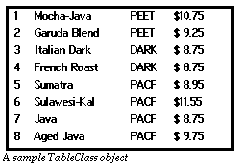
For example, whenever the
Table
object needs to draw a cell, it sends itself
MSG_TABLE_QUERY_DRAW
, specifying which cell needs to be drawn. You should intercept this message; your handler should look up the data stored in that cell, and draw its contents. Similarly, when a user edits a cell, you first tell the
Table
object what the
current
contents of the cell are (by intercepting
MSG_TABLE_START_EDIT_CELL_TEXT
). The
Table
then brings up a
VisText
which contains the current contents of the cell. The user can edit or change this text. When the user is finished, the
Table
object informs the application (via
MSG_TABLE_DONE_EDIT_CELL_TEXT
) what the cell's new contents are. The application should intercept the message and store the new contents.
Since the
Table
refers to its cells by row and column numbers, you may wish to store its data in a GEOS
cell file
. A cell file is a GEOS VM file which uses special structures and routines to organize DB items so they can be accessed by row and column numbers, instead of by group and item handles. For more information about cell files, consult the "Database" chapter of the Concepts book provided with the SDK.
TableClass
is a subclass of
VisCompClass
. This lets you group Tables together with other Tables and other Vis objects. Note, however, that you are not permitted to add children to a
Table
object. When
TableClass
creates a
VisText
object to let users enter data, it makes that
VisText
a child of the
Table
; if you try to add children to the
TableClass
, you will interfere with that process, and cause many unpredictable problems.
This section describes the instance data fields defined for
TableClass
. It also describes how to set, examine, and change those fields which are of interest to the application.
The
TableClass
has the following instance data:
Code Display 5-1 TableClass Instance Data
/* TI_rows specifies the number of rows in the table object. This field can be set
 * dynamically with MSG_TABLE_SET_ROW_COUNT. This height includes the row
 * separators.
 */
    @instance		word		TI_rows;
/* TI_columns specifies the total number of columns in the table. All columns must
 * be visible at once (the table does not scroll horizontally). You must set this
 * field in your source file; it cannot currently be set at run-time.
 */
    @instance		word		TI_columns;
/* TI_visibleRows contains the number of rows currently displayed. You must set
 * this field in your source file; it cannot currently be set at run-time.
 */
    @instance		word		TI_visibleRows;
/* TI_topRow contains the row number of the first visible row. This is maintained
 * automatically by the Table object; applications should not set this field.
 */
    @instance		word		TI_topRow;
/* TI_tableFlags contains a record of TableFlags. This record is described below
 * in  Table Attributes.  */
    @instance		TableFlags		TI_tableFlags;
/* TI_rowFlags contains a record of TableRowFlags. This record is described below
 * in  Working with Rows. */
    @instance		TableRowFlags		TI_rowFlags;
/* TI_columnDefinitions contains the chunk handle of a list of column definitions.
 * Column definitions are discussed in  Defining Columns. */
    @instance		ChunkHandle		TI_columnDefinitions;
/* TI_rowHeight specifies the height of each row in "points" (72 points = 1 inch).
 * You must set this in your source code; there is no way to change this
 * dynamically.
 */
    @instance		word		TI_rowHeight;
/* This field specifies the Table object's TableBorderFlags, which specify the
 * border and bounds for the Table object. TableBorderFlags are described
 * below in  Table Attributes. */
    @instance		TableBorderFlags			TI_borderFlags;
/* The following instance data fields are for internal use by the Table object.
 * You should not set, inspect, or change any of these fields, either in your
 * source code or at run-time.
 */
    @instance		TableCellLocation			TI_currentSelectionStart =
	{ T_NONE_SELECTED, T_NONE_SELECTED };
    @instance		TableCellLocation			TI_currentSelectionEnd =
	{ T_NONE_SELECTED, T_NONE_SELECTED };
    @instance		TableCellLocation			TI_lastSelectionStart =
	{ T_NONE_SELECTED, T_NONE_SELECTED };
    @instance		TableCellLocation			TI_lastSelectionEnd =
	{ T_NONE_SELECTED, T_NONE_SELECTED };
@instance Rectangle TI_bounds = {0, 0, 0, 0};
@instance TableRangeInversionType TI_tableRangeInversion;
    @instance		TableCellLocation			TI_lastCell = {
			T_NONE_SELECTED,
			T_NONE_SELECTED};
@instance TableSelectionDrawStyleType TI_selectionDrawStyle;
@instance TablePrivateFlags TI_privateFlags;
@instance ChunkHandle TI_textObj;
Table Attributes
Defining Columns
Working with Rows
TableFlags, TableBorderFlags, MSG_TABLE_SET_FLAGS, MSG_TABLE_GET_FLAGS, MSG_TABLE_SET_BORDER_FLAGS, MSG_TABLE_GET_BORDER_FLAGS
There are a few attributes which apply to the entire
Table
. Ordinarily, you would set these up when you define the
Table
, and leave them unchanged; however, you can get or change these attributes at will, by sending messages.
Every
Table
has a record of
TableFlags
, stored in the instance data field TI
_tableFlags
. This record contains the following flags:
-
TF_MAIN_TABLE
-
This flag indicates that this Table is the main (primary) table below the TableContent object. A Table marked with this flag will be the one that is sent scroll messages from the TableView. This is important if you use a separate
TableClass
object to contain headers for your table. (See Table Headings.)
-
TF_INTERNAL_DRAG_DROP
-
This flag should not be modified; it is internally managed. If this flag is set, this indicates that the Table is in drag-and-drop mode from one location in the Table to another location within that same Table; this lets the user copy one cell to another.The user does this by start-selecting the cell he or she wants to copy, and dragging ("hold-selecting") the pointer to the new location, then releasing the pointer ("end-selecting"); the cell's contents will be copied to the new location. If TF_EXIT_DRAG_DROP_UPON_COMPLETION is set, the
Table
will automatically clear TF_INTERNAL_DRAG_DROP after every drag-drop operation. (See Dragging and Dropping.)
-
TF_EXTERNAL_DRAG_DROP
-
This flag should not be modified; it is internally managed. If this flag is set, this indicates that the Table is in drag-and-drop mode from a location outside the Table to another location within the Table.
-
TF_ENABLE_AUTO_SCROLLING
-
If this flag is set, the
Table
will automatically scroll whenever the user clicks the pointer inside the
Table
and drags it across the top or bottom boundary. This flag does not affect any other scrolling behavior you may have added to your Table (such as scroll buttons in the parent TableView).
-
TF_SELECTION_ALWAYS_VISIBLE
-
If this flag is set, a Table's selection will always remain visible when scrolling. Any scrolling that might move the current selection off-screen will result in the movement of the selection (row by row) to stay visible. In other words, this flag does not ensure that the current selection remains visible; it only ensures that a selection bar exists on-screen.
-
TF_FIXED_SELECTION
-
This flag is currently unsupported.
-
TF_EXIT_DRAG_DROP_UPON_COMPLETION
-
If this flag is set, when the user finishes a drag-and-drop operation, the
Table
will automatically leave drag-and-drop mode, clearing TF_INTERNAL_DRAG_DROP. (See Dragging and Dropping.) If you do not set this flag, once you begin a drag and drop operation, you will need to manually exit drag and drop by clearing the TF_INTERNAL_DRAG_DROP flag yourself. (This is not recommended.)
-
TF_TARGETABLE
-
If this flag is set, the Table object will grab the target whenever it receives a
MSG_META_START_SELECT
. Unless your Table is display-only, you will probably always want this flag set.
-
TF_NOTIFY_SELECTION_CHANGED
-
If this flag is set, the Table object will send itself
MSG_TABLE_NOTIFY_SELECTION_CHANGED
whenever the stored selection value changes. If you wish to have that message sent (and intercept it) you must set this flag.
You may set these bits in TI
_tableFlags
when you define the table object in your source file. If you wish to change the
TableFlags
record of an existing
Table
object, you must do this by sending the object
MSG_TABLE_SET_FLAGS
, not by editing TI
_tableFlags
directly. You can find out the current settings of
TI_tableFlags
by sending
MSG_TABLE_GET_FLAGS
to the
Table
object.
Each table object also has a record of
TableBorderFlags
, stored in the instance data field TI
_borderFlags
. This record specifies what borders should be drawn around the
Table
. This record has the following flags:
-
TBF_BOX_BORDERS
-
If this flag is set, a box will be drawn around the entire portion of the
Table
visible on-screen. Setting this flag is equivalent to setting TBF_TOP_BORDER, TBF_BOTTOM_BORDER, TBF_LEFT_BORDER, and TBF_RIGHT_BORDER.
-
TBF_TOP_BORDER
-
If this flag is set, a line will be drawn at the top border of the portion of the
Table
visible on-screen.
-
TBF_BOTTOM_BORDER
-
If this flag is set, a line will be drawn at the bottom border of the portion of the
Table
visible on-screen.
-
TBF_LEFT_BORDER
-
If this flag is set, a line will be drawn at the left border of the portion of the
Table
visible on-screen.
-
TBF_RIGHT_BORDER
-
If this flag is set, a line will be drawn at the right border of the portion of the
Table
visible on-screen.
-
TBF_BOX_MARGINS
-
If this flag is set, margins will be added around the entire portion of the
Table
visible on-screen. Setting this flag is equivalent to setting TBF_TOP_MARGIN, TBF_BOTTOM_MARGIN, TBF_LEFT_MARGIN, and TBF_RIGHT_MARGIN.
-
TBF_TOP_MARGIN
-
If this flag is set, a margin will be added along the top border of the portion of the
Table
visible on-screen.
-
TBF_BOTTOM_MARGIN
-
If this flag is set, a margin will be added along the bottom border of the portion of the
Table
visible on-screen.
-
TBF_LEFT_MARGIN
-
If this flag is set, a margin will be added along the left border of the portion of the
Table
visible on-screen.
-
TBF_RIGHT_MARGIN
-
If this flag is set, a margin will be added along the right border of the portion of the
Table
visible on-screen.
To find out what
TableBorderFlags
are currently set, send MSG_TABLE_GET_BORDER_FLAGS to the
Table
. As with
TableFlags
, you may set the instance field TI
_borderFlags
in your source file, but you may not alter it directly at run-time; instead, you can set the field indirectly, by sending
MSG_TABLE_SET_BORDER_FLAGS
to the
Table
object.
MSG_TABLE_GET_FLAGS
TableFlags MSG_TABLE_GET_FLAGS();
This message returns the current
TableFlags
settings in the recipient's TI
_tableFlags
field. To change this field, send
MSG_TABLE_SET_FLAGS
.
Source: Unrestricted.
Destination: Any
TableClass
object.
Parameters: None.
Return: The
TableFlags
record currently stored in the
Table
object's TI
_tableFlags
field.
Structures: The
TableFlags
record (see Every Table has a record of TableFlags, stored in the instance data field TI_tableFlags. This record contains the following flags:).
MSG_TABLE_SET_FLAGS
void	MSG_TABLE_SET_FLAGS(
        TableFlags		setTableFlags,
        TableFlags		unsetTableFlags);
This message alters the
TableFlags
settings in the recipient's TI
_tableFlags
field. To find out what the current settings are, send
MSG_TABLE_GET_FLAGS
.
Source: Unrestricted.
Destination: Any
TableClass
object.
Parameters:
setTableFlags
All the flags in this record will be turned
on
.
-
unsetTableFlags
- All the flags in this record will be turned
off
.
Return: Nothing.
Structures: The
TableFlags
record (see Every Table has a record of TableFlags, stored in the instance data field TI_tableFlags. This record contains the following flags:).
MSG_TABLE_GET_BORDER_FLAGS
TableBorderFlags MSG_TABLE_GET_BORDER_FLAGS();
This message returns the current
TableBorderFlags
settings in the recipient's TI
_borderFlags
field. To change this field, send
MSG_TABLE_SET_BORDER_FLAGS
.
Source: Unrestricted.
Destination: Any
TableClass
object.
Parameters: None.
Return: The
TableBorderFlags
record currently stored in the
Table
object's TI
_borderFlags
field.
Structures: The
TableBorderFlags
record (see Each table object also has a record of TableBorderFlags, stored in the instance data field TI_borderFlags. This record specifies what borders should be drawn around the Table. This record has the following flags:).
MSG_TABLE_SET_BORDER_FLAGS
void	MSG_TABLE_SET_BORDER_FLAGS(
        TableBorderFlags		borderFlags);
This message alters the
TableBorderFlags
settings in the recipient's TI
_borderFlags
field. To find out what the current settings are, send
MSG_TABLE_GET_FLAGS
.
Source: Unrestricted.
Destination: Any
TableClass
object.
Parameters:
borderFlags
The current value in TI
_borderFlags
will be replaced by the value in this record.
Return: Nothing.
Structures: The
TableBorderFlags
record (see Each table object also has a record of TableBorderFlags, stored in the instance data field TI_borderFlags. This record specifies what borders should be drawn around the Table. This record has the following flags:).
TableColumnDefinition, TableColumnFlags, TableRangeInversionType, MSG_GEN_TABLE_GET_COLUMN_COUNT
When you create a
Table
object, you must specify what columns the
Table
has. Typically, each column will represent a different kind of data, and can be of a different length. When you define a
Table
object, you specify how many columns the table will have; this number is fixed for the table, and cannot be changed later. (It is possible to have your Table switch the column definitions that they use, although it will take a fair amount of work on your part; that is discussed in Changing Column Definitions.) You can find out how many columns a table has by sending it
MSG_TABLE_GET_COLUMN_COUNT
.
Each column has its own definition--stored in the Table's TI_
columnDefinitions
array--specified by a
TableColumnDefinition
structure that cannot be changed later. This structure has the following definition:
 typedef struct {
	TableColumnFlags			TCD_flags;
	word			TCD_width;
} TableColumnDefinition;
-
TCD
_flags
- This is a
TableColumnFlags
record (described on The TableColumnFlags record has the following flags: below).
-
TCD
_width
- This is the width of the column in points (72 points = 1 inch, so 28.3 points ª 1 centimeter).
The
TableColumnFlags
record has the following flags:
-
TCF_DRAW_RIGHT_SEPARATOR
-
If this flag is set, the column will have a solid line drawn on its right border (separating it from the next column to its right). This right-separator will not be drawn if the column is the last (right-most) column in the Table.
-
TCF_START_SELECT
-
If this flag is set, then if the user performs a "start-select" anywhere in the column, the
Table
object will send itself MSG_TABLE_SELECT.
-
TCF_END_SELECT
-
If this flag is set, then if the user performs an "end-select" anywhere in the column, the
Table
object will send itself MSG_TABLE_SELECT.
-
TCF_DRAG_SELECT
-
If this flag is set, then if the user performs a pointer drag that crosses cell boundaries within the column, or enters or leaves the column, the
Table
object will send itself MSG_TABLE_SELECT.
-
TCF_DOUBLE_SELECT
-
If this flag is set, then if the user double-clicks anywhere in the column, the
Table
object will present a
VisText
, allowing the user to edit the contents of the cell. (See Editing Cells.)
-
TCF_RESELECT
-
If this flag is set, then if the user performs a "start-select" in the column on a cell that is already in a range of selected cells, the
Table
object will send itself MSG_TABLE_SELECT.
-
TCF_HOLD_SELECT
-
If this flag is set, then if the user performs a "start-select" in the column on a cell and holds for a certain period of time, the Table will send itself MSG_TABLE_SELECT. This flag also sets the TF_INTERNAL_DRAG_DROP flag.
-
TCF_TRIT
- This is a three-bit field. The value in this field is a member of the
TableRangeInversionType
enumerated type; it specifies how the
Table
should display selected cells in this column.
TableRangeInversionType
specifies which cells should be drawn as highlighted when the user performs a selection action. Note that each column has its own
TableRangeInversionType
value. If a selection action crosses from one column into another, the
Table
uses the
TableRangeInversionType
of the last column the pointer was in.
TableRangeInversionType
has the following values:
-
TRIT_CELL
- When the user selects a cell in this column, highlight just that cell.
-
TRIT_ROW
- When the user selects a cell in this column, highlight the entire row containing that cell.
-
TRIT_COLUMN
-
When the user selects a cell in this column, highlight the entire visible portion of this column (i.e. every cell in this column that is (at least partially) visible on-screen).
-
TRIT_MULTI_ROW
-
Highlight the area bounded by the two cells in which the selection started and ended. The selection is made row by row as if all cells were in a single sequence with the last (right-most) cell of one row being followed by the first (left-most) cell of the next row. (One can think of this selection being analogous to a text selection across several lines.)
-
TRIT_RECTANGLE
-
Highlight all the cells in the rectangle pointed by the start-select cell and the end-select cell.
-
TRIT_MULTI_ROW_FULL
-
Highlight the row in which the user start-selects, and all rows through which the user drags the selection pointer.
-
TRIT_MULTI_COL_FULL
-
Highlight the first column in which the user start-selects, and all columns through which the user drags the selection pointer.
-
TRIT_NONE
- This indicates that the
Table
should not highlight any selections.
When you create a
Table
, you must specify how many columns the table has, and what the characteristics of each column are. You specify the number of columns the
Table
has by setting TI
_columns
to that number. You cannot change the number of columns in the
Table
after the
Table
has been created. To find out how many columns a
Table
has, send it
MSG_TABLE_GET_COLUMN_COUNT
.
To specify the attributes of each column, you must create a chunk in the same object block as the
Table
. That chunk must contain an array of
TableColumnDefinition
structures, one for each column in the
Table
. The structures should be in the same order as the columns (i.e. the left-most column would be the first structure in the array).
MSG_GEN_TABLE_GET_COLUMN_COUNT
word MSG_GEN_TABLE_GET_COLUMN_COUNT();
This message returns the number of columns in a
Table
object.
Source: Unrestricted.
Destination: Any
Table
object.
Parameters: None.
Return: The number of columns in the
Table
.
TableRowFlags, MSG_TABLE_GET_ROW_FLAGS, MSG_TABLE_SET_ROW_FLAGS, MSG_TABLE_GET_ROW_COUNT, MSG_TABLE_SET_ROW_COUNT
In a
Table
object, rows and columns are fundamentally different. Each column has its own properties; columns are generally used to display different kinds of information. Rows, on the other hand, are similar throughout a
Table
. Each row may contain different data, but all rows have the same basic structure throughout a given
Table
.
This has some consequences. For example, all columns are usually displayed; the
Table
should be wide enough to display all visible columns at once.
All the rows, on the other hand, are generally
not
displayed at once. The
Table
will display as many rows as it has room for; the user can scroll the table to see other rows. Also, while there are row properties (defined in
TableRowFlags
) that are similar in nature to the column properties defined in
TableColumnFlags
, you cannot set these properties individually for a row; all rows must have the same
TableRowFlags
.
The instance data field TI
_rowFlags
specifies what
TableRowFlags
will be used for every row in the table.
TableRowFlags
is a word-sized record with the following field:
-
TRF_DRAW_ROW_SEPARATOR
-
If this field is set, the
Table
will draw a line below each column separating the rows. No line will be drawn below the Table's last row.
To find out how TI
_rowFlags
is set, send
MSG_TABLE_GET_ROW_FLAGS
to the
Table
. To change the settings in this field, send MSG_TABLE_SET_ROW_FLAGS.
To find out how many rows a table has, send it
MSG_TABLE_GET_ROW_COUNT
. You can also add or remove rows at will by sending MSG_TABLE_SET_ROW_COUNT. This message adds rows to, or removes them from, the end of the
Table
.
MSG_TABLE_GET_ROW_FLAGS
TableRowFlags MSG_TABLE_GET_ROW_FLAGS();
This message returns the current settings of a
Table
object's TI
_rowFlags
field. This field holds the
TableRowFlags
used for every row in the
Table
.
Source: Unrestricted.
Destination: Any
TableClass
object.
Parameters: Nothing.
Return: The
TableRowFlags
used for all rows in the
Table
.
Structures:
TableRowFlags
(described on TRF_DRAW_ROW_SEPARATOR If this field is set, the Table will draw a line below each column separating the rows. No line will be drawn below the Table's last row.).
MSG_TABLE_SET_ROW_FLAGS
void	MSG_TABLE_SET_ROW_FLAGS(
        TableRowFlags		flags);
This message changes current settings of a
Table
object's TI
_rowFlags
field. This field holds the
TableRowFlags
used for every row in the
Table
.
Source: Unrestricted.
Destination: Any
TableClass
object.
Parameters:
flags
This is the new set of
TableRowFlags
to be used for every row in the
Table
.
Return: Nothing.
Structures:
TableRowFlags
(described on TRF_DRAW_ROW_SEPARATOR If this field is set, the Table will draw a line below each column separating the rows. No line will be drawn below the Table's last row.).
MSG_TABLE_GET_ROW_COUNT
word MSG_TABLE_GET_ROW_COUNT();
This message returns the total number of rows in a
Table
object.
Source: Unrestricted.
Destination: Any
TableClass
object.
Parameters: Nothing.
Return: The number of rows in the
Table
.
MSG_TABLE_SET_ROW_COUNT
void	MSG_TABLE_SET_ROW_COUNT(
        word	rowCount);
This message changes the
Table
object's total number of rows. If the new row count is smaller than the old one, the last rows will be truncated.
Source: Unrestricted.
Destination: Any
TableClass
object.
Parameters:
rowCount
The new number of rows the
Table
should contain. Rows are added and removed at the end of the
Table
.
Return: Nothing.
The Table object is designed to be easy to use. You cannot use a
TableClass
object directly; you will need to define a subclass of
TableClass
in order to intercept certain required messages. You will also need to set a few instance fields when you define the Table in your source code.
The Table object must appear within a TableContent object. If it is within a regular VisContent, crashes may result.
When you create a Table object, you will need to set the following instance data fields (the other fields may be left with there default values):
-
TI
_rows
- This is the number of rows in the
Table
. You may set this field to zero. (You can add and remove rows at run-time.) For more information, see Working with Rows.
-
TI
_columns
- This is the number of columns in the
Table
. This must be at least one. You cannot currently add or remove columns at run-time. For more information, see Defining Columns.
-
TI
_visibleRows -
This is the number of rows visible on-screen at any one time; thus, this field, together with TI
_rowHeight
, define the height of a
Table
object. This field must be at least 1.
-
TI
_columnDefinitions -
This is the handle of a chunk containing an array of
TableColumnDefinition
structures, which specify the properties of the
Table
's columns. For more information, see Defining Columns.
-
TI
_rowHeight
-
This is the height of a row in points (72 points = 1 inch, so 28.3 points ª 1 centimeter). This must be larger than zero.
In order to use a
TableClass
object, you must define handlers for a few messages. As a general rule, your handlers should call the
TableClass
handlers after they take their actions; in some cases, your handlers's main role is to add extra data to the message, which will be interpreted by the default handler.
You should define handlers for the following tasks:
-
You must define a handler for
MSG_TABLE_QUERY_DRAW
, which redraws a specified cell to a GState. (The
TableClass
object doesn't actually know what the contents of the cells are; it relies on your subclass's code to draw the cells.) For more information, see Drawing Cells.
-
You may wish to define a handler for
MSG_TABLE_SELECT
. This will let you know when the user has selected a cell; you can perform appropriate actions, and decide whether to call the default handler (which highlights the selection and performs other selection actions). For more information, see Selecting Cells.
-
You should provide handlers for
MSG_TABLE_START_EDIT_CELL_TEXT
and
MSG_TABLE_DONE_EDIT_CELL_TEXT
. These messages let the user edit the text in
Table
cells. By subclassing the messages, you can provide the current cell contents for the user to edit, and store the user's text after he or she has finished entering it. For more information, see Editing Cells.
-
The
Table
object supports drag-and-drop copying. However, it does not actually know what the cells contain, so it can't perform the copying itself. Instead, when the user performs a drag-and-drop operation, the
Table
object sends
MSG_TABLE_DRAG_DROP_COMPLETE
; the application should intercept the message, and do any appropriate copying of data. For more information, see Dragging and Dropping.
-
You may want to implement your own custom scrolling behavior. (
TableClass
supports auto-scrolling with the addition of the TF_ENABLE_AUTO_SCROLLING flag; auto scrolling does not, however, provide any visual UI (such as scroll buttons) to enable scrolling.) If you want custom scrolling behavior, you will need to implement scroll buttons in your TableView and appropriate messages to your Table object (such as
MSG_TABLE_SCROLL_SINGLE_UP
and
MSG_TABLE_SCROLL_SINGLE_DOWN)
. For more information, see Custom Scrolling Behavior.
-
If you link a Locator object to your Table (see LocatorClass) you will want to intercept
MSG_TABLE_CHAR_LOCATE
and
MSG_TABLE_STRING_LOCATE
to implement your own search methods. For more information, see Handling Locator Searches.
-
If you want to change your column definitions dynamically, you will need to define additional column definitions and switch which ones you use under the Table. There is no API currently for this behavior; you will need to write the messages and handle them yourself. This is discussed in Changing Column Definitions.
Drawing Cells
Selecting Cells
Editing Cells
Dragging and Dropping
Custom Scrolling Behavior
Handling Locator Searches
Table Headings
Changing Column Definitions
MSG_TABLE_QUERY_DRAW, MSG_TABLE_REDRAW_TABLE, MSG_TABLE_REDRAW_ROW, MSG_TABLE_REDRAW_COLUMN, MSG_TABLE_REDRAW_CELL, MSG_TABLE_REDRAW_RANGE
The
Table
object does not actually store the contents of any of the cells. Instead, it helps the application manage and display its data. This means that whenever the
Table
needs to draw a cell (e.g. when the
Table
scrolls, or when a cell is covered and then exposed), it has to ask the application to draw it.
Whenever the
Table
object needs to draw a cell, it sends itself
MSG_TABLE_QUERY_DRAW
, once for each cell that needs to be redrawn. This message is designed to be subclassed; if you do not subclass it, the default handler will not do anything, and the cell will not be drawn.
The message comes with two arguments:
-
A
TableCellLocation
structure, specifying which cell needs to be redrawn.
-
A
GStateHandle
. The GState's clipping region is set to the current cell's boundaries; the current position in the GState is the upper-left corner of the cell.
You should intercept this message and take whatever actions are necessary to draw the contents of the cell. Ordinarily, this means calling a routine such as
GrDrawTextAtCP()
. The default handler doesn't do anything, so you need not call the superclass. You should
not
free the passed GState.
For efficiency reasons, the
Table
object actually uses the same GState for several cells that all need to be redrawn at once. For example, suppose the
Table
needs to redraw cells (10, 0), (10, 1), (10, 2), and (10, 3). The table will take the following steps:
-
First, the
Table
creates a GState.
-
The
Table
sets the GState's clipping region to the boundaries of cell (10, 0), and puts the current position in the upper-left corner of that cell.
-
The
Table
sends itself MSG_TABLE_QUERY_DRAW, specifying that cell (10, 0) needs to be redrawn.
-
The application intercepts this message, drawing the contents of cell (10, 0) to the passed GState.
-
The
Table
changes the GState's clipping region to the boundaries of cell (10, 1), and moves the current position to the upper-left corner of that cell.
-
The
Table
sends itself MSG_TABLE_QUERY_DRAW, specifying that cell (10, 1) needs to be redrawn.
-
The application intercepts this message, drawing the contents of cell (10, 1) to the passed GState.
-
The
Table
repeats steps 5-7 for cells (10, 2) and (10, 3).
-
Finally, the
Table
frees the GState.
Code Display 5-2 Handling MSG_TABLE_QUERY_DRAW
/* For simplicity, we previously defined an instance field to hold the optr of the
 * chunk array we are using. We will lock down that data using that instance
 * field. CoffeeTableClass is a subclass of TableClass. */
@method CoffeeTableClass, MSG_TABLE_QUERY_DRAW
{
    char *data;
    word cArrayIndex, size;
cArrayIndex = (location.TCL_row * TABLE_COLS) + location.TCL_column;
MemLock(OptrToHandle(pself->CTI_chunkArray));
    data = ChunkArrayElementToPtr((pself->CTI_chunkArray),
				cArrayIndex, &size);
GrDrawTextAtCP(gstate, data, 0);
    MemUnlock(OptrToHandle(pself->CTI_chunkArray);
}
The
Table
automatically sends
MSG_TABLE_QUERY_DRAW
when it knows a part of the
Table
may be inaccurate, e.g. when the user has edited a cell. You can also instruct the
Table
to redraw part or all of itself by sending it one of the
MSG_TABLE_REDRAW...
messages. These messages instruct the
Table
to send out appropriate
MSG_TABLE_QUERY_DRAW
messages for one or more visible cells. There are five
MSG_TABLE_REDRAW...
messages:
-
MSG_TABLE_REDRAW_TABLE -
This instructs the
Table
to redraw all cells visible on-screen.
-
MSG_TABLE_REDRAW_ROW -
This instructs the
Table
to redraw a specified row, if it's on-screen.
-
MSG_TABLE_REDRAW_COLUMN -
This instructs the
Table
to redraw those cells in a specified column which are on-screen.
-
MSG_TABLE_REDRAW_CELL -
This instructs the
Table
to redraw a specified cell, if it's on-screen.
-
MSG_TABLE_REDRAW_RANGE -
This instructs the
Table
to redraw the portion of a specified range of cells that is visible on-screen.
MSG_TABLE_QUERY_DRAW
void	MSG_TABLE_QUERY_DRAW(
        TableCellLocation		location,
        GStateHandle		gstate);
The
Table
object sends itself this message whenever a cell needs to be redrawn. The default handler does nothing; when you use a
Table
object, you must subclass this message to draw the cell.
Source: A
TableClass
object.
Destination: The
Table
sends this message to itself.
Parameters:
location
The cell which needs to be redrawn.
-
gstate
- A
GStateHandle
specifying a GState you should draw to. The GState's clipping region is set to the cell boundaries; the current position (CP) is the upper-left corner of the cell.
Return: Nothing. (You should
not
free the GState.)
Structures:
TableCellLocation
(see A TableCellLocation structure is used to specify a cell within the Table. It has the following definition:).
Interception: This message must be intercepted; your handler must draw the cell's contents. You need not call the superclass's handler (which does nothing).
MSG_TABLE_REDRAW_TABLE
void MSG_TABLE_REDRAW_TABLE();
This message instructs the
Table
to redraw the entire portion of the
Table
visible on-screen (creating a GState, sending out appropriate
MSG_TABLE_QUERY_DRAW
messages, etc.).
Source: Unrestricted.
Destination: Any
TableClass
object.
Parameters: None.
Return: Nothing.
MSG_TABLE_REDRAW_ROW
void	MSG_TABLE_REDRAW_ROW(
        word	row);
This message instructs the
Table
to redraw a specified row, if it's visible on-screen (creating a GState, sending out appropriate
MSG_TABLE_QUERY_DRAW
messages, etc.).
Source: Unrestricted.
Destination: Any
TableClass
object.
Parameters:
row
The index of the row to redraw. (The first row has index 0.)
Return: Nothing.
MSG_TABLE_REDRAW_COLUMN
void	MSG_TABLE_REDRAW_COLUMN(
        word	column);
This message instructs the
Table
to redraw those cells in a specified column that are visible on-screen (creating a GState, sending out appropriate
MSG_TABLE_QUERY_DRAW
messages, etc.).
Source: Unrestricted.
Destination: Any
TableClass
object.
Parameters:
column
The index of the column to redraw. (The first column has index 0.)
Return: Nothing.
MSG_TABLE_REDRAW_CELL
void	MSG_TABLE_REDRAW_CELL(
        TableCellLocation		location);
This message instructs the
Table
to redraw a specified cell if it is visible on-screen (creating a GState, sending out appropriate
MSG_TABLE_QUERY_DRAW
messages, etc.).
Source: Unrestricted.
Destination: Any
TableClass
object.
Parameters:
location
The cell to redraw.
Return: Nothing.
Structures: The cell is specified with a
TableCellLocation
structure (described on A TableCellLocation structure is used to specify a cell within the Table. It has the following definition:).
MSG_TABLE_REDRAW_RANGE
void	MSG_TABLE_REDRAW_RANGE(
        TableCellRange		cellRange);
This message instructs the
Table
to redraw a range of cells (creating a GState, sending out appropriate
MSG_TABLE_QUERY_DRAW
messages, etc.).
Source: Unrestricted.
Destination: Any
TableClass
object.
Parameters:
cellRange
The range of cells to redraw.
Return: Nothing.
Structures: The cell range to redraw is specified with a
TableCellRange
structure (described on A TableCellRange structure is used to specify a range of cells. It has the following definition:).
TableCellLocation, CellRange, MSG_TABLE_SELECT, MSG_TABLE_GET_CURRENT_SELECTION, MSG_TABLE_SET_CURRENT_SELECTION. MSG_TABLE_SET_ROW_RANGE_SELECTION
You can configure under what circumstances a
Table
object will select a cell by setting the
TableColumnFlags
for the various columns in the table. The
TableColumnFlags
determine what will constitute a "selection event", and what cells will be selected. When a selection event occurs, the
Table
object will send itself MSG_TABLE_SELECT. This message passes two arguments:
-
A
TableCellLocation
structure (described below). This structure specifies which cell was selected. If more than one cell was selected, this will specify the cell where the selection action
began
.
-
A
TableColumnFlags
record. This record specifies two things. It specifies what pointer event or events caused the selection; and it specifies, in its TCF_TRIT field, which cells should be highlighted as selected.
A
TableCellLocation
structure is used to specify a cell within the
Table
. It has the following definition:
typedef struct {
	word	TCL_row;
	word	TCL_column;
} TableCellLocation;
-
TCL
_row
- This is the cell's row. (The first row is row number zero, as always.)
-
TCL
_column
- This is the cell's column. (The first column is column number zero, as always.)
The default handler for this message causes an area of the table to be highlighted. The area is determined by the TCF_TRIT field of the
TableColumnFlags
record passed with the message. If you wish, you may intercept the message before it is handled by the default handler, and change the TCF_TRIT field in the passed
TableColumnFlags
; this will change which cells will be highlighted by the default handler. For example, if you change the TCF_TRIT field to contain TRIT_NONE, then the default handler will not highlight any rows.
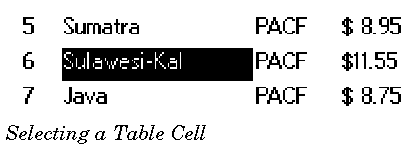
You can find out what cells, if any, are currently selected by sending MSG_TABLE_GET_CURRENT_SELECTION to the
Table
object. This message takes one argument, a pointer to a
TableCellRange
structure. The handler will fill in this structure with the currently selected range.
A
TableCellRange
structure is used to specify a range of cells. It has the following definition:
typedef struct {
	TableCellLocation				TCR_start;
	TableCellLocation				TCR_end;
} TableCellRange;
-
TCR
_start
- This
TableCellLocation
specifies the first cell in the selected range. (The
TableCellLocation
structure is described on A TableCellLocation structure is used to specify a cell within the Table. It has the following definition:.)
-
TCR
_end
- This
TableCellLocation
specifies the last cell in the selected range. (Note that this cell may be higher up in the
Table
then TCR
_start
; the same range is defined, whichever order TCR
_start
and TCR
_end
appear in.)
Note that a
TableCellRange
forms a rectangle. You can change the selected cells at any time by sending
MSG_TABLE_SET_CURRENT_SELECTION
. This message is passed one argument, a
TableCellRange
structure; that structure specifies what the current selection should be. The
Table
object responds by changing the current selection but does not send a
MSG_TABLE_SELECT
. To cancel the current selection (and leave the
Table
with nothing selected), send
MSG_TABLE_SET_CURRENT_SELECTION
, and put the constant T_NONE_SELECTED in the TCR
_start.
TCL
_column
field of the passed
TableCellRange
structure. (If you do this, the other fields of the
TableCellRange
will be ignored.) Again,
MSG_TABLE_SELECT
is not sent in this case.
MSG_TABLE_SELECT
void	MSG_TABLE_SELECT(
        TableCellLocation		location,
        TableColumnFlags		tableColumnFlags);
The
Table
object sends this message to itself when the user selects one or more cells with a pointer object. (I.e. this message is generated through use of the pointer for Table selection, not when the selection changes through other means.) The
TableColumnFlags
of the various columns determine whether a particular mouse action is interpreted as a selection. If it is, the
Table
object sends itself this message, instructing itself to highlight the appropriate cells.
Source: A
TableClass
object.
Destination: The
Table
object sends this message to itself.
Parameters:
location
This is the selected cell; that is, the cell in which the pointer was when the column's selection criteria were met.
-
tableColumnFlags
- This is a record of
TableColumnFlags
. The flags specify two things: They specify what criteria were used to determine that a selection had happened; and they specify (in the TCF_TRIT field) which cells should be highlighted.
Return: Nothing.
Structures:
TableCellLocation
(see A TableCellLocation structure is used to specify a cell within the Table. It has the following definition:) and
TableColumnFlags
(see The TableColumnFlags record has the following flags:).
Interception: You may intercept this. If you intercept this message, you can change which cells will be highlighted by changing the
tableColumnFlags.
TCF_TRIT field.
MSG_TABLE_GET_CURRENT_SELECTION
void	MSG_TABLE_GET_CURRENT_SELECTION(
        TableCellRange *		cellRange);
This message retrieves what cells are currently selected within a Table object
Source: Unrestricted.
Destination: Any
TableClass
object.
Parameters:
cellRange
A pointer to a
TableCellRange
structure.
Return:
*cellRange
will specify the first and last selected cells.
Structures:
TableCellRange
(described on A TableCellRange structure is used to specify a range of cells. It has the following definition:).
MSG_TABLE_SET_CURRENT_SELECTION
void	MSG_TABLE_SET_CURRENT_SELECTION(
        TableCellRange		cellRange);
This message changes what cells are currently selected within a Table object.
Source: Unrestricted.
Destination: Any
TableClass
object.
Parameters:
cellRange
A pointer to a
TableCellRange
structure, specifying what cells should be selected. (If
cellRange.
TCR
_start.
TCL
_column
= T_NONE_SELECTED, no cells will be selected.)
Return: Nothing.
Structures:
TableCellRange
(described on A TableCellRange structure is used to specify a range of cells. It has the following definition:).
TableEditCellTextParams, MSG_TABLE_START_EDIT_CELL_TEXT, MSG_TABLE_DONE_EDIT_CELL_TEXT, MSG_TABLE_STOP_CELL_EDIT
The
Table
objects make it easy for the user to edit cells. If the column has TCF_DOUBLE_SELECT enabled, a user can edit a cell in the column just by double-clicking on it. When the user does this, the
Table
object will take the following steps:
-
First, it sends itself
MSG_TABLE_START_EDIT_CELL_TEXT
. The default handler causes the
Table
object to create a
VisText
under the TableContent which the user can enter text in.
-
When the user has finished entering the text, and closes the
VisText (by pressing
ENTER
)
, the
Table
object sends itself
MSG_TABLE_DONE_EDIT_CELL_TEXT
, passing along the text that the user entered in the
VisText
. The application should store the text wherever it stores the
Table
's data.
If the user finishes editing by clicking in another cell, a
MSG_TABLE_STOP_CELL_EDIT
is generated and the edit is cancelled. (If your program does not wish to cancel the edit under these circumstances, then intercept the message.)
-
Finally, the
Table
sends itself a
MSG_TABLE_QUERY_DRAW
for the cell which was edited. The application should intercept this message and redraw the cell normally.
Both
MSG_TABLE_START_EDIT_CELL_TEXT
and
MSG_TABLE_DONE_EDIT_CELL_TEXT
use a special structure, the
TableEditCellTextParams
structure; the structure's fields have slightly different meanings for each message. This structure has the following definition:
typedef struct {
	TableCellRange			TECT_cells;
	MemHandle			TECT_text;
	word			TECT_length;
} TableEditCellTextParams;
-
TECT
_cells
- This is a
TableCellRange
structure (described on A TableCellRange structure is used to specify a range of cells. It has the following definition:), specifying what cells have been selected for editing. If a single cell has been selected for editing, TCR
_start
will be the same as TCR
_end
.
-
TECT
_text
- This is the handle of a global memory block, containing the text in the cell.
-
TECT
_length
- This is the length of the string in TECT
_text
, or zero if the string is null-terminated.
MSG_TABLE_START_EDIT_CELL_TEXT
creates a VisText object (within the TableContent and over the cell to be edited) to allow the user to edit the cell's text. This message passes a set of
TableEditCellTextParams
containing the cell range being edited (TECT
_cells
) and the initial text to display to the user (if any) in TECT
_text
and TECT
_length
. This text object, which may be referenced via
TI_textObj
, can persist between edits. Thus, if you change its instance data, be aware that these changes may or may not linger in future edits. You may wish to update any changes in your
MSG_TABLE_START_EDIT_CELL_TEXT
handler.
The default handler clears both TECT
_text
and TECT
_length
. Your application may subclass the message, and fill in these fields with default text for the
VisText
(e.g., you may want to retrieve the text currently in the specified cell and display that to be edited). If TECT
_text
contains a null handle, the
VisText
will start out blank.
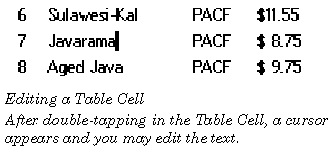
To provide this default text, allocate a global memory block, copy the string into the beginning of the block, and put the block's handle in TECT
_text
. (You should not store anything else in this block, because the block will be freed by the handler for MSG_TABLE_DONE_EDIT_CELL_TEXT.) If a valid handle was not passed in TECT
_text
, it allocates a global memory block for the
VisText
to write to; otherwise, the
VisText
will simply write to the block specified in TECT
_text
(overwriting the original text).
Code Display 5-3 Handling MSG_TABLE_START_EDIT_CELL_TEXT
@method CoffeeTableClass, MSG_TABLE_START_EDIT_CELL_TEXT
{
    char *cellData, *textPtr;
    word cArrayIndex, size;
    cArrayIndex = (params.TECT_cells.TCR_start.TCL_row * TABLE_COLS) +
		params.TECT_cells.TCR_start.TCL_column;
/* The superclass will free this block that we allocate here. */
    params.TECT_text = MemAlloc(CELL_DATA_LENGTH, HF_SWAPABLE, HAF_LOCK);
    textPtr = MemDeref(params.TECT_text);
/* Retrieve the current data from the cell and stuff it in the memory block. */
    pself = ObjDerefVis(oself);
    MemLock(OptrToHandle(pself->CTI_chunkArray);
    cellData = ChunkArrayElementToPtr((pself->CTI_chunkArray),
				cArrayIndex, &size);
    strcpy(textPtr, cellData);
MemUnlock(OptrToHandle(pself->CTI_chunkArray));
params.TECT_length = 0; /* Zero indicates null-termination. */
    @callsuper();
}
When the user has finished entering text, the
VisText
object sends the Table object MSG_TABLE_DONE_EDIT_CELL_TEXT. This message takes one argument, a
TableEditCellTextParams
structure. The TECT
_text
field will contain the handle of a global memory block, containing the text the user has entered.The application should intercept the message, so it can store the new text; afterwards, it should call the default handler, which will free the memory block specified by TECT
_text
and perform other bookkeeping chores. The Table object will automatically send an appropriate
MSG_TABLE_QUERY_DRAW
, so the cell will be redrawn with the new contents.
Note that the Table object supports allowing the user to edit several cells at once. If you choose to allow this, you must decide what the functionality is; that is, in your handler for MSG_TABLE_START_EDIT_CELL_TEXT, you must decide what cell's text to display in the
VisText
(e.g. the first cell's text, or a composite of all the selected cells's text); and in your handler for MSG_TABLE_DONE_EDIT_CELL_TEXT, you must decide where and how to store the entered text (e.g. whether to overwrite all the edited cells with the same text, divide the entered text amongst the cells, etc.).
Code Display 5-4 Handling MSG_TABLE_DONE_EDIT_CELL_TEXT
@method CoffeeTableClass, MSG_TABLE_DONE_EDIT_CELL_TEXT
{
    char *cellData, *textPtr;
    word cArrayIndex, size;
    cArrayIndex = (params.TECT_cells.TCR_start.TCL_row * TABLE_COLS) +
		params.TECT_cells.TCR_start.TCL_column;
textPtr = MemLock(params.TECT_text);
/* Make sure we're null terminated ... */
textPtr[CELL_DATA_LENGTH -1]; = (char)0;
/* Lock down the cell and copy the string to it. */
MemLock(OptrToHandle(pself->CTI_chunkArray));
    cellData = ChunkArrayElementToPtr((pself->CTI_chunkArray),
		cArrayIndex, &size);
    strcpy(cellData, textPtr);
    MemUnlock(OptrToHandle(pself->CTI_chunkArray));
    @callsuper();
}
MSG_TABLE_START_EDIT_CELL_TEXT
void	MSG_TABLE_START_EDIT_CELL_TEXT(
        TableEditCellTextParams			params);
The
Table
object sends itself this message when the user starts editing a cell. The default handler brings up a
VisText
for the user to enter text. You should intercept this message, so you can look up and provide the cell's current contents; that way, the contents will be put in the
VisText
for the user to edit.
Source: Any
Table
object.
Destination: The
Table
sends this message to itself.
Parameters:
params.
TECT
_cells
This field specifies the cell or cells the user is editing.
-
params.
TECT
_text
- This field contains the handle of a global memory block, containing the text to be displayed in the
VisText
when it is brought up. When this message is sent,
params.
TECT
_text
contains a null handle; your subclass's handler may allocate a global memory block, copy the text into that block, and write the handle here. (Note that the
VisText
will write to the block you specify, so it should not contain any other data.)
-
params.
TECT
_length -
This is the length (in bytes) of the string in the block specified by
params.
TECT
_text
. If this field is zero, the string is null-terminated.
Return: Nothing. (If
params.
TECT
_text
contained a null handle, the default handler will allocate a block.)
Structures:
TableEditCellTextParams
(see Both MSG_TABLE_START_EDIT_CELL_TEXT and MSG_TABLE_DONE_EDIT_CELL_TEXT use a special structure, the TableEditCellTextParams structure; the structure's fields have slightly different meanings for each message. This structure has the following defi).
Interception: You should intercept this message to provide the text for the
VisText
to present for editing (which will usually be the current contents of the cell being edited). After this, you should call the default handler with
@callsuper
, so the
VisText
can be created.
Warnings: If you put a memory handle in
params.
TECT
_text
, that block will be written to by the
VisText
, and freed by the handler for MSG_TABLE_DONE_EDIT_CELL_TEXT; so make sure it doesn't contain any other data.
MSG_TABLE_DONE_EDIT_CELL_TEXT
void	MSG_TABLE_DONE_EDIT_CELL_TEXT(
        TableEditCellTextParams				params);
The
VisText
object sends this message to the Table object after the user has finished entering data. The application should intercept this message to copy data into its storage location; you should also make sure to call the default handler, which will remove the
VisText
and perform other bookkeeping chores.
Source: This message is sent by a
VisText
object used by the
Table
for text editing.
Destination: The
VisText
sends this message to its parent
Table
.
Parameters:
params.
TECT
_cells
This field specifies the cell or cells the user has edited.
-
params.
TECT
_text
- This field contains the handle of a global memory block, containing the text the user entered in the
VisText
. The default handler will free this block.
-
params.
TECT
_length -
This is the length (in bytes) of the string in the block specified by
params.
TECT
_text
. If this field is zero, the string is null-terminated.
Return: Nothing. (The default handler will free the block specified by
params.
TECT
_text
.)
Structures:
TableEditCellTextParams
(see Both MSG_TABLE_START_EDIT_CELL_TEXT and MSG_TABLE_DONE_EDIT_CELL_TEXT use a special structure, the TableEditCellTextParams structure; the structure's fields have slightly different meanings for each message. This structure has the following defi).
Interception: You should intercept this message, so you can copy the new data into your application's storage. Afterwards, you should make sure to call the default handler with
@callsuper
.
MSG_TABLE_STOP_EDIT_CELL_TEXT
void MSG_TABLE_STOP_EDIT_CELL_TEXT();
The
VisText
object sends this message to the Table if the user clicks outside the cell while editing data. This cancels the edit: the Table returns to its normal mode and the user's edits are discarded.
Source: This message is sent by a
VisText
object used by the
Table
for text editing.
Destination: The
VisText
sends this message to its parent
Table
.
Parameters: None.
Return: Nothing.
Interception: If your program wants to treat a tap outside the edited cell as a signal that the edit is finished, not cancelled, then get the (abandoned) text that the user was editing from the VisText child of the Table. The chunk handle of this VisText child is stored in TI_textObj. You can build an optr to the VisText by using:
textObj = ConstructOptr(OptrToHandle(@YourTable),
pself->TI_textObj);
To retrieve the text, use:
@call textObj::MSG_VIS_TEXT_GET_ALL_PTR(buffer);
where "buffer" has been declared as "char buffer[]".
Once you've retrieved the text, the remainder of your method should just save away this data in whatever data structure you've built to hold your table's data -- just like in the method for
MSG_TABLE_DONE_EDIT_CELL_TEXT
.
TableDragDropCompleteParams, TableDragDropCell, TableDragDropFlags, MSG_TABLE_DRAG_DROP_COMPLETE
The
Table
object supports the standard GEOS drag-drop functionality. It allows the user to select one or more cells, then drag their contents to other cells in the
Table
. However, the
Table
object does not actually keep track of the contents of the cells. Instead, it detects which cells the user dragged and where the user dropped them, and it notifies the application with
MSG_TABLE_DRAG_DROP_COMPLETE
. The application should intercept this message and use this information to copy data to its appropriate places in its storage.
The
Table
is put in drag-and-drop mode when the
TableFlags
bit TF_INTERNAL_DRAG_DROP is set (for example through the sending of
MSG_TABLE_SET_FLAGS
). If the Table's column flags contain TCF_HOLD_SELECT, holding for the specified period of time to initiate a "hold" will also set the TF_INTERNAL_DRAG_DROP flag. When the
Table
is in drag-and-drop mode, the user can copy a cell's contents to another cell by clicking on one cell, dragging the pointer to the other cell, and releasing. If the
TableFlags
bit TF_EXIT_DRAG_DROP_UPON_COMPLETION is set, the
Table
will automatically clear TF_INTERNAL_DRAG_DROP after every drag-and-drop.
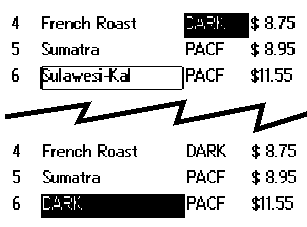
The
Table
object sends
MSG_TABLE_DRAG_DROP_COMPLETE
when the user finishes a drag-and-drop operation. This message passes one argument, a
TableDragDropCompleteParams
structure. This structure has the following definition:
typedef struct {
	TableDragDropCell				TDDCP_dragDrop;
	TableDragDropFlags				TDDCP_flags;
} TableDragDropCompleteParams;
-
TDDCP
_dragDrop -
This structure specifies which cells are being copied, and where they will be copied to. The
TableDragDropCell
structure is described below.
-
TDDCP
_flags
- This field is a record of
TableDragDropFlags
flags, described below.
The cells being dragged, and the location to which they are being dropped, are specified with a
TableDragDropCell
structure. This structure has the following definition:
typedef struct {
	TableCellRange			TDDC_from;
	TableCellRange			TDDC_to;
} TableDragDropCell;
-
TDDC
_from
- The cell or cells being dragged.
-
TDDC
_to
- The cell or cells on which TDDC
_from
is being dropped.
When
MSG_TABLE_DRAG_DROP_COMPLETE
is sent, the TDDCP
_flags
field of the passed
TableDragDropCompleteParams
is blank. If you intercept this message, you can change this field, setting any
TableDragDropFlags
bits in this field. Currently, only one flag is defined:
-
TDDF_DONT_RESCAN_CELLS
-
If this flag is clear, the
Table
will redraw all visible cells after a drag-drop operation. If it is set, it will not redraw any cells. (You may wish to set this flag, then force redrawing of a few affected cells with an appropriate
MSG_TABLE_REDRAW...
message; these messages are described on The Table automatically sends MSG_TABLE_QUERY_DRAW when it knows a part of the Table may be inaccurate, e.g. when the user has edited a cell. You can also instruct the Table to redraw part or all of itself by sending it one of the MSG_TABLE_REDR.)
You should intercept the message, and perform any appropriate data operations, e.g. copying the data from the "dragged" cell to the location where it was "dropped".
If the TF_EXIT_DRAG_DROP_UPON_COMPLETION flag is set, drag and drop mode will be exited upon receipt of
MSG_TABLE_DRAG_DROP_COMPLETE
. Otherwise, you will need to determine when you wish to exit drag and drop mode and clear the TF_INTERNAL_DRAG_DROP flag manually by sending the Table
MSG_TABLE_SET_FLAGS
. (You might wish to do this if you want to drag and drop to multiple locations, for example.) Because you are modifying an internal flag in this process, this approach is highly discouraged.
Code Display 5-5 Implementing Drag and Drop Mode
/* This message is sent to the Table whenever it completes a drag and drop
 * operation (by releasing the pen). In your handler, determine the starting and
 * ending point of the operation and copy the data from one location to the other.
 */
@method CoffeeTableClass, MSG_TABLE_DRAG_DROP_COMPLETE
{
    char *fromData, *toData;
    word fromIndex, toIndex, size;
    /* We are storing our data in a chunk array (not shown). We obtain a
     * linear index into this data based on the cell row and column. */
    fromIndex =
	(cellFromTo.TDDCP_dragDrop.TDDC_from.TCR_start.TCL_row * TABLE_COLS) +
	cellFromTo.TDDCP_dragDrop.TDDC_from.TCR_start.TCL_column;
    toIndex =
	(cellFromTo.TDDCP_dragDrop.TDDC_to.TCR_start.TCL_row * TABLE_COLS) +
	cellFromTo.TDDCP_dragDrop.TDDC_to.TCR_start.TCL_column;
/* Check if this drag and drop is from within the same Table. */
if (pself->TI_tableFlags & TF_INTERNAL_DRAG_DROP) {
MemLock(OptrToHandle(pself->CTI_chunkArray);
	fromData = ChunkArrayElementToPtr((pself->CTI_chunkArray),
					fromIndex, &size);
	toData = ChunkArrayElementToPtr((pself->CTI_chunkArray),
					toIndex, &Size);
    	/* Copy the actual data. *
	strcpy(toData, fromData);
	MemUnlock(OptrToHandle(pself->CTI_chunkArray));
    }
    /* Call the superclass. This will also exit the Table from drag and drop mode
     * if the TF_EXIT_DRAG_DROP_UPON_COMPLETION flag is set. */
    @callsuper();
}
MSG_TABLE_DRAG_DROP_COMPLETE
void	MSG_TABLE_DRAG_DROP_COMPLETE(
        TableDragDropCompleteParams					cellFromTo);
The
Table
object sends this message to itself when the user has finished performing a drag-and-drop operation. Application writers who wish to perform operations on the data being dragged and dropped must intercept this message.
Source: A
TableClass
object.
Destination: The
Table
object sends this message to itself.
Parameters:
cellFromTo.
TDDCP
_dragDrop
This field specifies what cells are being dragged, and where they are being dropped.
-
cellFromTo.TDDCP_flags -
This field is initially blank. If you intercept the message, you can change the flags before calling the default handler.
Return: Nothing.
Structures: The arguments are passed in a
TableDragDropCompleteParams
structure (described on The Table object sends MSG_TABLE_DRAG_DROP_COMPLETE when the user finishes a drag-and-drop operation. This message passes one argument, a TableDragDropCompleteParams structure. This structure has the following definition:).
Interception: Must intercept to perform data operations necessary to implement the drag-and-drop. Afterwards, make sure to call the default handler with
@callsuper
. The default handler will cause the entire visible portion of the
Table
to be redrawn, unless you have set the TDDF_DONT_RESCAN_CELLS bit in
cellFromTo.TDDCP_flags
.
MSG_TABLE_SCROLL, MSG_TABLE_SCROLL_TO_ROW, MSG_TABLE_SCROLL_SINGLE_UP, MSG_TABLE_SCROLL_SINGLE_DOWN
Auto-scrolling (enabled by adding the TF_ENABLE_AUTO_SCROLLING to TI_
tableFlags
) allows the user to scroll within a Table by clicking within a Table and dragging above or below the current Table bounds. The Table will scroll in the direction that the pen was dragged. Auto-scrolling does not provide any UI to scroll the Table, however. If you want scroll buttons, for example, you will need to take the following steps:
-
Make sure you've declared a
TableViewClass
object. Set its
TVI_mainTable
field to the Table you wish to scroll.
-
Mark the Table that you want scrolling to occur with the TF_MAIN_TABLE flag.
MSG_TABLE_SCROLL
is a generic scrolling message that implements a particular scroll operation (passed in the message's
TableScrollType
parameter). Possible Table scroll types are:
-
TST_SCROLL_PAGE_UP
-
TST_SCROLL_PAGE_DOWN
TST_SCROLL_UP
TST_SCROLL_DOWN
TST_SCROLL_TOP
TST_SCROLL_DOWN
TST_SCROLL_UP scrolls the Table up one row. Similarly, TST_SCROLL_DOWN scrolls the Table down one row.
You may send
MSG_TABLE_SCROLL_TO_ROW
if you want the Table to scroll to a particular (zero-based) row. The Table will scroll so as to make that row the first visible row, if possible.
MSG_TABLE_SCROLL_SINGLE_UP
scrolls the Table up one row. Similarly,
MSG_TABLE_SCROLL_SINGLE_DOWN
scrolls the Table down one row.
MSG_TABLE_CHAR_LOCATE, MSG_TABLE_STRING_LOCATE
The Table object may wish to respond to searches on its data. For this purpose, the Table object is designed to interact with a
LocatorClass
object; the Locator object is a UI object that the user uses to initiate searches on the Table. The Locator object implements this search by sending the Table object one of two messages. You must intercept these messages to provide searching behavior.
TableClass
provides no default searching behavior.
The Locator object is discussed in detail in LocatorClass; however, some background on how the Locator works is illustrative to providing the Table`s searching behavior.
The Locator object can be in one of two modes:
index
mode or
text
search
mode. The Locator object will appear and act differently depending on which mode it is in.
When the Locator object is in index mode, it takes the form of an action bar, shown below.
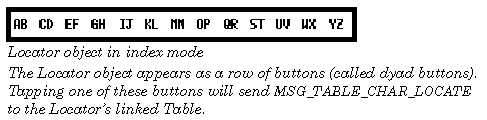
Tapping on one of the Locator's dyad buttons (`AB', `EF', etc.) will send the Table object
MSG_TABLE_CHAR_LOCATE
, passing it the letter to search. Repeatedly clicking on a dyad button will cycle through the two letters to perform the search. For example, clicking once on the `AB' dyad button will send the Table
MSG_TABLE_CHAR_LOCATE
with the character `A.' Clicking again on that button will send the Table
MSG_TABLE_CHAR_LOCATE
with the character `B.' Clicking yet again on that button will send the Table
MSG_TABLE_CHAR_LOCATE
with the character `C.'
If you have a Locator linked to your Table, you will want to intercept
MSG_TABLE_CHAR_LOCATE
to make sure that you can implement searching behavior in index mode.
When the Locator object is in text search mode, the action bar "morphs" into a text search entry field shown below.

Entering text into the text search field of the Locator will send the linked Table object
MSG_TABLE_STRING_LOCATE
after each keystroke, passing it the current contents of the text entry field. You will want to intercept this message to provide your searching method for when the Locator object is in text mode.
You may find it convenient to write a generic searching routine that your message handlers for both
MSG_TABLE_CHAR_LOCATE
and
MSG_TABLE_STRING_LOCATE
may call. This searching routine will likely want to perform a case-insensitive search on your Table. You may want to use a routine such as
LocalCmpStringsNoCase()
for this purpose. Note that you must still provide separate message handlers for each of these messages even if you provide a generic searching routine.
Code Display 5-6 Implementing a Search
/* This code implements a single character search initiated by a Locator object. */
@method MyTableClass, MSG_TABLE_CHAR_LOCATE
{
    char *data;			/* Pointer to the table data array. */
    word index =0;			/* A linear index into the Table data array. */
    /* We'll want to send MSG_TABLE_SET_CURRENT_SELECTION, so we'll want
     * to pass a TableCellRange.
     */
    TableCellRange	selection;
Boolean searchResult; /* Reports the success or failure of the search. */
    /* We initialize the selection to start searching from the beginning of the
     * Table. */
    selection.TCR_start.TCL_row					= 0;
    selection.TCR_start.TCL_column					= 0;
    selection.TCR_end.TCL_row					= 0;
    selection.TCR_end.TCL_column					= 0;
    /* Lock down our data block. */
    MemLock(OptrToHandle(@cellDataArray));
    /* Perform a case-insensitive search on the data in the array. We do this by
     * searching linearly, multiplying by the total number of columns in the
     * Table, so that we only search the first column. (We could have also
     * performed our search cell by cell in a linear fashion; in that case we
     * would not have multiplied the index by TABLE_COLS in the `step' section of
     * the while statement.) The data in this case is assumed to be stored in a      * linear chunk array. */
    do {
	data = ChunkArrayElementToPtr(@cellDataArray, index, 1);
    } while(
	(LocalCmpStringsNoCase(data, searchText, 1)) &&
	((++index * TABLE_COLS) < (TABLE_COLS * TABLEROWS)));
/* We've finished searching; we can free the data block. */
MemUnlock(OptrToHandle(@cellDataArray));
    /* Determine if search found a match. */
    if (index >= (TABLE_COLS * TABLE_ROWS))
    {
	searchResult = TRUE;			/* Indicates no match was found. */
    }
    else
    {
	/* If successful, set selection to "current" index cell. */
	selection->TCR_start.TCL_row 				= index / TABLE_COLS;
	selection->TCR_start.TCL_column 				= index % TABLE_COLS;
	selection->TCR_end.TCL_row				= selection->TCR_start.TCL_row;
	selection->TCR_end.TCL_column				= selection->TCR_start.TCL_column;
@call self::MSG_TABLE_SET_CURRENT_SELECTION(selection);
	searchResult = FALSE;			/* Indicates that we found a match. */
    }
    return(searchResult);				/* We don't call the superclass. Default behavior
				 * is to return TRUE indicating no matches were
				 * found. */
}
MSG_TABLE_CHAR_LOCATE
Boolean	MSG_TABLE_CHAR_LOCATE(
        char		searchChar);
This message is sent to the
TableClass
object by the Locator object instructs a Locator object (in index mode) to locate the entered character within the
TableClass
object that is in the Locator's LI_
destination
field. It does this by sending the Table object
MSG_TABLE_CHAR_LOCATE
, passing it the search character. You will want to intercept that message within your subclass of
TableClass
to implement your search criteria.
When in index mode, this message is sent with a single index letter (e.g. `A', or `B' in the "AB" dyad) of the tapped dyad button. Repeatedly tapping on a dyad button will cycle through the indexed letters, sending out this message a separate time for each tap (first with `A,' then with `B,' and then with `A' again). For this reason, make sure that code that implements this message is not run under the UI thread. (Doing so may result in bothersome screen "glitches" as the Table scrolls first to the `A' entries, then to the `B' entries, etc.
Source: The Locator object.
Destination: The Locator's linked Table object.
Parameters:
searchChar
Character to search. Passed from one of the Locator's dyad buttons.
Return: Non-zero if the search failed. Note that if you do not write a search method for
TableClass
, this message will always return non-zero.
MSG_TABLE_STRING_LOCATE
Boolean	MSG_TABLE_STRING_LOCATE(
        char		*text);
This message instructs a Locator object (in text mode) to locate the entered string within the
TableClass
object that is in the Locator's LI_
destination
field. It does this by sending the Table object
MSG_TABLE_STRING_LOCATE
, passing it the pointer to the search string. You will want to intercept that message within your subclass of
TableClass
to implement your search criteria.
The Locator object enters text search mode whenever the user types a printable character on the keyboard; in that case, the
locateString
contains the character typed and a search (with this message) is performed. I.e. a search is performed after each successive character is entered. If the search is unsuccessful, the character will not appear.
Source: The Locator object.
Destination: A Locator object.
Parameters:
text
Pointer to the null-terminated search string to pass to
MSG_TABLE_STRING_LOCATE
.
Return: Non-zero if the search failed. Note that if you do not write a search method for TableClass, this message will always return non-zero.
TableClass
does not automatically support the drawing of
Table
headings. However, it is easy to implement this yourself.
To create a
Table
with headings, simply create two different
Table
objects: one for the body of the
Table
, and one for the headings. Make sure the two Tables have the same left and right margins, and make sure their columns are of the same width; but other than that, you can set up the two tables completely differently. For example, the upper
Table
(which would have only one line) might well not be user-editable or selectable.
Group the two Tables below the single
TableContent
object. Once you've set up the two Tables, you may want to experiment with headings and borders to get the look you want. Notice that the two
Table
s scroll independently. This means that when a user scrolls the lower
Table
, the same headings will always be visible at the top of the columns. You will want to add the TF_MAIN_TABLE flag to your main Table object so that it does not attempt to scroll the heading table.
Code Display 5-7 Adding a Header Table
/* A Header is simply a Table, though it is usually only one row. */
@object CoffeeTableClass, CoffeeTableHeader = {
    TI_rows = 1;			/* Because this is a header, only one row is needed. */
    TI_columns = MY_TABLE_COLS;				/* Make sure you have the same number of columns
				 * as in the main table. */
    TI_visibleRows = 1;
    TI_rowHeight = 18;			/* Your row height may be different than the row height
			 * of the main table. */
    TI_columnDefinitions = @CoffeeTableHeaderColumnDefs;
    TI_borderFlags = TBF_BOX_BORDERS;
    CTI_chunkArray = @CoffeeTableHeaderDataArray;
}
/* The column definition widths should match those of the main table. Headers
 * should not contain any TableColumnFlags, however. Set these to zero. */
@chunk TableColumnDefinition CoffeeTableHeaderColumnDefs[] = {
    0, 25,
    0, 100,
    0, 45,
    0, 70};
/* The Table header data array contains the strings to display in the Table
 * header. */
@chunkArray CellDataStruct CoffeeTableHeaderDataArray = {
    "#","Description","Type","$/lb."
};
You may wish in exceptional circumstances to display different columns than the ones you statically define using TI_
columnDefinitions
. In that case, you may want to define alternate column definitions and switch which ones you use at appropriate times in your application. There is a fair amount of overhead in doing this yourself--there currently exists no API to take care of this behavior--so you should make sure you want to take that approach.
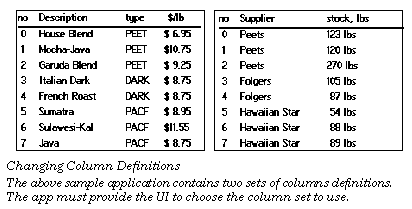
The following steps are recommended to get this behavior:
-
Define separate column definitions for each group of columns you want displayed. Each column definition should reside in its own separate chunk. Make sure that each set of column definitions resides within the resource block of the table object. (Because
TI_columnDefinitions
is a chunk handle, it cannot reference chunks outside of the resource.)
-
Create an instance field in your Table subclass to index which column definitions you are currently using. You will use this instance field to determine what chunk array of data to use.
-
Create separate chunk arrays to hold your individual sets of data and an instance field to hold the correct pointer to that chunk array. Alternatively, you could have one chunk array hold both sets of data and define an offset into the second set of data.
-
Define a message in your Table subclass to change the column definitions, passing it an index number of the column definitions you want to use. Set TI_
columnDefinitions
to the appropriate column definitions in your handler for this message. Also change your index number to indicate the new column definitions being used and the pointer to the chunk array of data.
-
Redraw the Table by sending
MSG_TABLE_REDRAW_TABLE
from this handler. This will dispatch
MSG_TABLE_QUERY_DRAW
to each of the affected cells.
-
Handle
MSG_TABLE_QUERY_DRAW
as usual.
Code Display 5-8 Dynamically Changing Column Definitions
/* First, make sure you create a message to change the column definitions and an
 * instance field to indicate which column definitions we are using. */
@class MyTableClass, TableClass;
@message void MSG_MY_TABLE_CHANGE_COLUMN_DEFINITIONS(int columnIndex);
    @instance int 			MTI_columnIndex = 0;
    @instance optr			MTI_chunkArray = NullOptr;
@endc;
@classdecl MyTableClass;
/* Define your column definitions. Make sure that each set of column definitions
 * adds up to 240 pixels across. Note that if you want headers for each of these
 * column definitions, you will need to handle that yourself.*/
#define MY_COLUMN_FLAGS (TCF_START_SELECT | TCF_DOUBLE_SELECT | TCF_DRAG_SELECT |
			TCF_HOLD_SELECT | TRIT_CELL )
@chunk TableColumnDefinition ColumnSet1[] = {
    MY_COLUMN_FLAGS, 25,
    MY_COLUMN_FLAGS, 100,
    MY_COLUMN_FLAGS, 45,
    MY_COLUMN_FLAGS, 70};
@chunk TableColumnDefinition ColumnSet2[] = {
    MY_COLUMN_FLAGS, 25,
    MY_COLUMN_FLAGS, 100,
    MY_COLUMN_FLAGS, 115};
/* Define our cell data in two separate chunk arrays. */
@chunkArray CellDataStruct myMainData = {
    "0","Viennese","DARK", "$ 8.75",
    "1","Italian","DARK","$ 8.75",
    "2","French","DARK","$ 9.25",
    "3","Sumatra","RICH","$ 8.95"};
@chunkArray CellDataStruct mySecondaryData = {
    "0","Mr. Cringle","1412 Dowdy Ln.",
    "1","Ms. Holworth","23 Abercrombie",
    "2","Jeeves","10 Downing St.",
    "3","Kahlia","345 Cedar St."};
/* Define your method for MSG_MY_TABLE_CHANGE_COLUMN_DEFINITIONS. */
@method MyTableClass, MSG_MY_TABLE_CHANGE_COLUMN_DEFINITIONS
{
    switch(columnIndex) {
	case COLUMN_SET_1:
	    pself->TI_columnDefinitions = OptrToHandle(@ColumnSet1);
	    pself->MTI_chunkArray = @myMaindata;
	    break;
	case COLUMN_SET_2:
	    pself->TI_columnDefinitions = OptrToHandle(@ColumnSet2);
	    pself->MTI_chunkArray = @mySecondaryData;
	    break;
	default:
	    break;
    }
pself->MTI_columnIndex = columnIndex;
    @call self::MSG_TABLE_REDRAW_TABLE;
}
/* Handle MSG_TABLE_QUERY_DRAW. Because we set up the MTI_chunkArray instance
 * field in MSG_MY_TABLE_CHANGE_COLUMN_DEFINITIONS, nothing special is done here.
 */
@method MyTableClass, MSG_TABLE_QUERY_DRAW
{
    char *data;
    word cArrayIndex, offset, size;
cArrayIndex = (location.TCL_row * TABLE_COLS) + location.TCL_column;
MemLock(OptrToHandle(pself->MTI_chunkArray));
    data = ChunkArrayElementToPtr((pself->MTI_chunkArray),
				cArrayIndex, &size);
GrDrawTextAtCP(gstate, data, 0);
    MemUnlock(OptrToHandle(pself->MTI_chunkArray);
}
A
TableContentClass
object manages
TableClass
objects. The TableContent is a visual grouping object (subclassed off of
VisContentClass
) and therefore manages the visual implementation of its children. A TableContent object will contain just two types of children: usually a single
TableClass
object, possibly an additional
TableClass
object acting as a set of headings, and a
LocatorClass
object. (
LocatorClass
is discussed later in the chapter.)
The TableContent object manages the dispatch of keyboard events to its Table anTableView object, and acts as the bridge between the generic and visual object hierarchies. The hierarchy of this arrangement is shown below:
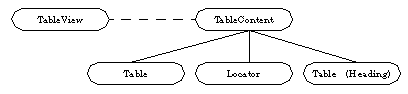
TableContent Instance Data
Altering TableContent Instance Data
TableContentClass
is a subclass of
VisContentClass
. As such, it inherits instance data and messages from that class. This section describes the instance data fields defined for
TableContentClass
. It also describes how to set, examine and change those fields which are of interest to developers.
Code Display 5-9 TableContentClass instance data
/*
 * TableContentClass is a subclass of VisContentClass.
 */
@default VCI_geoAttrs = (@default | VCGA_ORIENT_CHILDREN_VERTICALLY);
@instance byte TCI_kbdSend = 255;
@instance optr TCI_exclDestination = NullOptr;
@instance word TCI_childSpacing = 0;
@instance word TCI_childWrapSpacing = 0;
TCI_
kbdSend
is an internal field that determines whether keyboard messages will be sent to the TableContent's complement of children. (This is the default behavior.) If you want to send any keyboard events to any of the TableContent's children, this flag must be "on." You should not set or modify this flag directly; it should only be altered by sending the TableContent object MSG_TABLE_CONTENT_KBD_SEND_TO_CHILDREN_ON and MSG_TABLE_CONTENT_KBD_SEND_TO_CHILDREN_OFF.
TCI_
exclDestination
is an internal field that determines which specific child object is sent keyboard messages. If TCI_
exclDestination
is non-null, then keyboard messages will not be broadcast to all of the TableContent's children, but only to that specific object. This destination should only be altered by sending the TableContent
MSG_TABLE_CONTENT_GRAB_KBD_EXCLUSIVE
or
MSG_TABLE_CONTENT_RELEASE_KBD_EXCLUSIVE
(to set the output to null); the field should not be set or modified directly.
TCI_
childSpacing
sets the child spacing (in points) for the Table and Locator children of this TableContent object. You should not need to manipulate this field.
TCI_
childWrapSpacing
sets the child spacing for children that are forced to wrap (in points) for the children of the TableContent object. You should not need to manipulate this field.
MSG_TABLE_CONTENT_KBD_SEND_TO_CHILDREN_ON, MSG_TABLE_CONTENT_KBD_SEND_TO_CHILDREN_OFF, MSG_TABLE_CONTENT_GRAB_KBD_EXCLUSIVE, MSG_TABLE_CONTENT_RELEASE_KBD_EXCLUSIVE
By default, the TableContent broadcasts keyboard events to its children. If this behavior is not desired, you can send the TableContent
MSG_TABLE_CONTENT_KBD_SEND_TO_CHILDREN_OFF
. Sending the TableContent
MSG_TABLE_CONTENT_KBD_SEND_TO_CHILDREN_ON
turns keyboard event broadcasting back on.
Keyboard event broadcasting must be on for any child object to receive any keyboard events, even if a child object attempts to grabs the keyboard exclusive on its own. A TableContent's child can grab the keyboard exclusive by sending
MSG_TABLE_CONTENT_GRAB_KBD_EXCLUSIVE
to its parent TableContent object, passing it the optr of the child object (usually itself) which should be given the keyboard exclusive. If keyboard event broadcasting is not on, or if another child object already has the exclusive, the grab will not be successful.
The child object should also make sure to send its parent
MSG_TABLE_CONTENT_RELEASE_KBD_EXCLUSIVE
when it can release the keyboard exclusive.
MSG_TABLE_CONTENT_KBD_SEND_TO_CHILDREN_ON
Boolean MSG_TABLE_CONTENT_KBD_SEND_TO_CHILDREN_ON();
This message instructs the TableContent object to allow keyboard messages to be sent to its children. (This must be enabled if any child object is to grab the keyboard exclusive.) It does this by modifying the TableContent's TCI_
kbdSend
instance field. Do not modify this field yourself.
Source: Unrestricted.
Destination: A TableContent object.
Parameters: None.
Return:
true
(non-zero
)
if the TableContent object was not able to turn on keyboard dispatching to its children;
false
(zero) otherwise.
MSG_TABLE_CONTENT_KBD_SEND_TO_CHILDREN_OFF
Boolean MSG_TABLE_CONTENT_KBD_SEND_TO_CHILDREN_OFF();
This message instructs the TableContent object to disallow keyboard messages to be sent to its children. (If any child object currently has the keyboard exclusive, this message will not succeed in turning off keyboard event broadcasting.) The TableContent modifies this behavior by modifying the TableContent's TCI_
kbdSend
instance field. Do not modify this field yourself.
Source: Unrestricted.
Destination: A TableContent object.
Parameters: None.
Return:
true
(non-zero) if the TableContent object was not able to turn off keyboard dispatching to its children;
false
(zero) otherwise.
MSG_TABLE_CONTENT_GRAB_KBD_EXCLUSIVE
Boolean	MSG_TABLE_CONTENT_GRAB_KBD_EXCLUSIVE(
        optr		obj);
This message instructs the TableContent object to give the keyboard grab to the child object whose optr is passed in the message. It does this by modifying the TableContent's TCI_
exclDestination
modify this field yourself. Keyboard event broadcasting must be "on" for this grab to succeed.
Source: One of the TableContent's children
Destination: A TableContent object.
Parameters:
obj
Object to receive the TableContent's keyboard exclusive.
Return:
true
(non-zero)
if the child object was not able to grab the TableContent's keyboard exclusive;
false
(zero) otherwise.
MSG_TABLE_CONTENT_RELEASE_KBD_EXCLUSIVE
Boolean	MSG_TABLE_CONTENT_RELEASE_KBD_EXCLUSIVE(
        optr		obj);
This message instructs the TableContent object to release the keyboard grab from the child object whose optr is passed in the message. Only a child object which currently has the grab can release it. It does this by modifying the TableContent's TCI
_exclDestination
instance field, setting it to null. Do not modify this field yourself.
Source: Unrestricted.
Destination: A TableContent object.
Parameters:
obj
Object releasing the TableContent's keyboard exclusive.
Return:
true
(non-zero) if the child object was not able to release the TableContent's keyboard exclusive;
false
(zero) otherwise.
The
LocatorClass
is a subclass of the
TableClass
. Locator objects do not, however, behave like other Table objects. The Locator object is a specific object designed to be used in tandem with a linked Table object. An action taken on the Locator object will perform a searching action on the linked Table object. In most cases, you will simply want to include a Locator object in your application and link it to your Table. (You implement the actual searching algorithms in your Table object.) You do not need to subclass or add any behavior to the Locator object.
Each Table-Locator pair is placed within a parent TableContent. In the current version of GEOS, multiple tables may not appear under a TableContent (excepting, of course, that
LocatorClass
is actually a subclass of
TableClass
itself). The following information mirrors information appearing in Handling Locator Searches. Consult that section for information about implementing a search within your Table object. The information provided here is solely for completeness' sake.
Index Mode
Text Mode
LocatorClass Instance Data
Locator Actions
MSG_LOCATOR_DO_CHAR_LOCATE
The Locator object can be in one of two modes:
index
mode or
text
search
mode. The Locator object will appear and act differently depending on it operating mode.
When the Locator object is in index mode, it takes the form of an action bar, shown below:
Tapping on one of the Locator's dyad buttons (`AB', `EF', etc.) sends
MSG_LOCATOR_DO_CHAR_LOCATE
to the Locator object itself. The Locator responds to this request by sending
MSG_TABLE_CHAR_LOCATE
to its linked Table. Intercept that message in
TableClass
to provide your searching behavior.
Repeatedly clicking on a dyad button will cycle through the two letters of the dyad to perform the search. For example, clicking once on the `AB' dyad button will send the aforementioned messages with a character argument of `A.' Clicking again on that button will send these messages with an argument of `B' and clicking yet again on that button will send these messages with an argument of `A' again.
You will probably not want to implement any searching behavior in your Locator object; it is sufficient merely to include the Locator object and intercept
MSG_TABLE_CHAR_LOCATE
in the Table object itself. This is discussed in Handling Locator Searches.
MSG_LOCATOR_DO_CHAR_LOCATE
Boolean	MSG_LOCATOR_DO_CHAR_LOCATE(
        char		searchChar);
This message instructs a Locator object (in index mode) to locate the entered character within the
TableClass
object that is in the Locator's LI_
destination
field. It does this by sending the Table object
MSG_TABLE_CHAR_LOCATE
, passing it the search character. You will want to intercept that message within your subclass of
TableClass
to implement your search criteria.
When in index mode, this message is sent with a single index letter (e.g. `A', or `B' in the "AB" dyad) of the tapped dyad button. Repeatedly tapping on a dyad button will cycle through the indexed letters, sending out this message a separate time for each tap (first with `A,' then with `B,' and then with `A' again). For this reason, make sure that code that implements this message is not run under the UI thread. (Doing so may result in bothersome screen "glitches" as the Table scrolls first to the `A' entries, then to the `B' entries, etc.
Source: The Locator object.
Destination: A Locator object.
Parameters:
searchChar
Character to pass to
MSG_TABLE_CHAR_LOCATE
.
Return: Non-zero if the search failed. Note that if you do not write a search method for TableClass, this message will always return non-zero.
MSG_LOCATOR_DO_STRING_LOCATE
When the Locator object is in text search mode, the action bar "morphs" into a text search entry field shown below:
Entering text into the text search field will send
MSG_LOCATOR_DO_STRING_LOCATE
to itself. The Locator responds to this message by immediately sending its linked Table
MSG_TABLE_STRING_LOCATE
. Repeatedly entering valid characters will match succeeding characters.
For example, typing `B' in a Table object will send
MSG_TABLE_STRING_LOCATE
to the Table with the string "B." Typing `e' after that letter will send
MSG_TABLE_STRING_LOCATE
passing the string "Be." Whenever the Table can no longer find a match for its character string,
MSG_TABLE_STRING_LOCATE
will return TRUE (an error condition) and the character will not be allowed into the text entry field. You can complete a text mode search and return to index mode by pressing ENTER.
MSG_LOCATOR_DO_STRING_LOCATE
Boolean	MSG_LOCATOR_DO_STRING_LOCATE(
        char		*locateString);
This message instructs a Locator object (in text mode) to locate the entered string within the
TableClass
object that is in the Locator's LI_
destination
field. It does this by sending the Table object
MSG_TABLE_STRING_LOCATE
, passing it the pointer to the search string. You will want to intercept that message within your subclass of
TableClass
to implement your search criteria.
The Locator object enters text search mode whenever the user types a printable character on the keyboard; in that case, the
locateString
contains the character typed and a search (with this message) is performed. I.e. a search is performed after each successive character is entered. If the search is unsuccessful, the character will not appear.
Source: The Locator object.
Destination: A Locator object.
Parameters:
locateString
Pointer to the null-terminated search string to pass to
MSG_TABLE_STRING_LOCATE
.
Return: Non-zero if the search failed. Note that if you do not write a search method for TableClass, this message will always return non-zero.
LocatorClass
contains a number of instance fields that are usually not accessed directly. In most cases, these instance fields are maintained by the system. In some cases, you can send messages to alter these instance fields.
Code Display 5-10 LocatorClass Instance Data
/*
 * LocatorClass is a subclass of TableClass. Do not treat it as a
 * normal subclass of TableClass, however. Many of the instance fields of
 * TableClass undergo special treatment in LocatorClass (especially the column
 * definitions). All of the Locator object's instance fields (except
 * LI_destination) are internal and maintained by the Locator object itself.
 */
@instance LocatorStateFlags LI_state;
@instance ChunkHandle LI_actionBarColDefsHandle = 0;
@instance ChunkHandle LI_textSearchColDefsHandle = 0;
@instance TableCellLocation LI_selectionStart = 0;
@instance LocatorSelections LI_selections = 0;
@instance optr LI_destination = 0;
LI_
state
is an internal field that is maintained by the
LocatorClass
object. This field determines whether the Locator has been initialized, and the status of its current state (
index
or
text search
). Do not alter this field.
LI_
actionBarColDefsHandle
is an internal field; this field contains the chunk handle of the column definitions for the Locator object when it is in
index
mode. Note that the Locator object contains two separate column definitions, unusual for normal Table objects. Do not alter this field.
LI
_textSearchColDefsHandle
is an internal field; this field contains the chunk handle of the column definitions for the Locator object when it is in
text search
mode. Do not alter this field.
LI
_selectionStart
and LI_
selections
are internal fields that manage information about the dyad button's states. Do not alter this field.
LI_
destination
contains the optr of the object to receive messages (e.g.,
MSG_LOCATOR_DO_STRING_LOCATE
) sent out by this Locator object. This is usually the sibling Table object that searches are performed on. This field should be set statically.
MSG_LOCATOR_CHANGE_TO_ACTION_BAR, MSG_LOCATOR_CHANGE_TO_TEXT_SEARCH, MSG_LOCATOR_DO_STRING_LOCATE, MSG_LOCATOR_DO_CHAR_LOCATE
Each time the Locator object changes its mode (
index
or
text search
) it will send itself either
MSG_LOCATOR_CHANGE_TO_ACTION_BAR
(if it is changing to index mode) or
MSG_LOCATOR_CHANGE_TO_TEXT_SEARCH
.
For example, if the Locator is in text search mode, it is desirable to revert to index mode whenever it loses the focus (and loses keyboard input). If the Locator is in text search mode and does lose the focus, the Locator's superclass (
TableClass
) senses this, sending
MSG_TABLE_STOP_EDIT_CELL_TEXT
to itself. In the handler for that message, the Locator sends itself
MSG_LOCATOR_CHANGE_TO_ACTION_BAR
.
MSG_LOCATOR_CHANGE_TO_ACTION_BAR
void MSG_LOCATOR_CHANGE_TO_ACTION_BAR();
This message instructs the Locator object to appear as an "action bar" with a row of dyad buttons ("AB", "CD", etc.). This
index
mode is distinct from the Locator's other mode, that of a text search field. When the Locator object is in index mode, tapping (once) on a dyad button will send MSG_LOCATOR_DO_STRING_LOCATE with the first letter of the dyad tapped on (e.g. "A" in the `AB' dyad; "E" in the `EF' dyad). Repeatedly tapping on that dyad button will send
MSG_LOCATOR_DO_STRING_LOCATE
with the succeeding characters. The Locator object automatically "wraps" when it performs a search with its second character. I.e. after `B' is sent in the `AB dyad, `A' is sent again.
Source: The Locator object sends this message to itself.
Destination: A Locator object.
Parameters: None.
Return: Nothing.
Interception: May intercept to receive notification when the Locator object is switching into
index
mode. Make sure to pass this message on to the superclass, however.
MSG_LOCATOR_CHANGE_TO_TEXT_SEARCH
void MSG_LOCATOR_CHANGE_TO_TEXT_SEARCH();
This message instructs the Locator object to appear as a text search field. When the Locator object is in
text
search
mode any characters entered into the device will appear within the Locator's text search field. Pressing RETURN will send the text string to the Table with MSG_LOCATOR_DO_STRING_LOCATE.
Source: The Locator object.
Destination: A Locator object.
Parameters: None.
Return: Nothing.
Interception: May intercept to receive notification when the Locator is switching into
text search
mode. Make sure to pass this message on to the superclass, however.
This document is a single-page version of a a multi-page document, suitable for easy printing.