
 GEOS SDK TechDocs|
|
GEOS SDK TechDocs|
|  5.3 Precise Coordinates |
  5.5 Larger Document Spaces
 Most programmers can work quite well within the document space regardless of how coordinates will correspond to device coordinates. However, some programmers might need to know about the device coordinates as well. The system provides clever algorithms for going from document to device space for all programmers, as well as routines to get device coordinate information from the device driver.
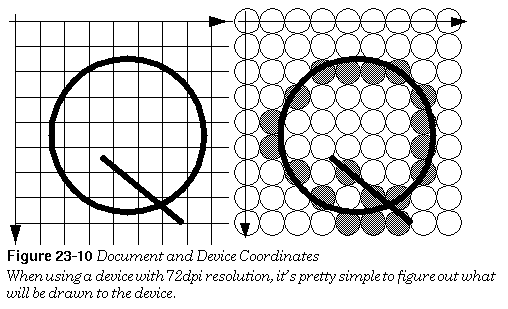
Consider a device whose pixels are exactly 1/72nd of an inch, such that no scaling is required to map document units to device units. The relationship of the coordinate systems is illustrated below. Note that a pixel falls between each pair of document units. This is a further demonstration of the concept that document coordinates specify a location in the document coordinate space, not a pixel.
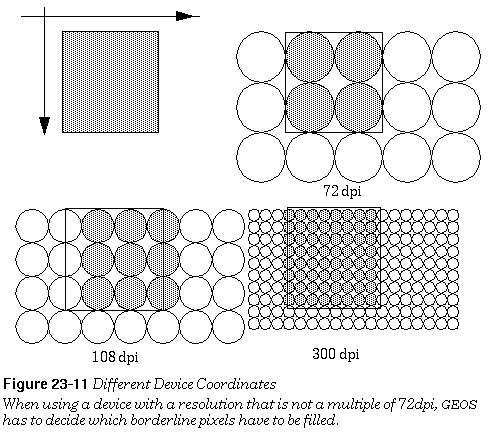
Next consider a device that has a resolution of 108 dpi, which is 1.5 times greater than our default 72 dpi. That is, there are 1.5x1.5 pixels on the device for each square document unit. The basic problem here is that the coordinates that are specified in document space map to non-integer pixels in device space. The graphics system would like the pixels to be half-filled along two edges of the rectangle (see the figure below). Unfortunately, a pixel must be either filled or empty, so the system needs a set of rules to follow in this situation. These rules are
These rules might seem a little odd: Why not just fill all the pixels that would be touched by the area? One of the problems with this approach is that areas that did not overlap in the document space would overlap on the device. Or more specifically, they would overlap only on some devices (depending on the resolution), which is even worse. The rules have the property that adjoining areas in document space will not overlap in any device space.
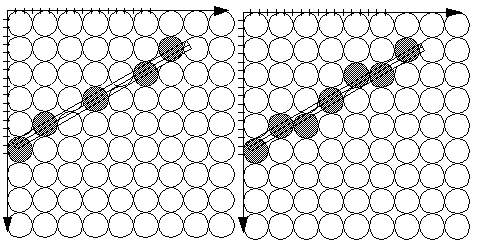
Our next set of potential problems comes with lines. Lines can be very thin and thus might be invisible on some low-resolution devices. If the graphics system used the rules for filled objects then some thin lines would be only partially drawn on low resolution devices. GEOS uses Bresenham's algorithm for drawing straight thin lines, ensuring that a continuous group of pixels will be turned on for a line (see the figure below). This continuity is insured due to the behavior of the algorithm:
Since ellipses and Bézier curves are drawn as polylines, Bresenham's algorithm will work with them.
GrTransform(), GrUntransform(), GrTransformWWFixed(), GrUntransformWWFixed()
Given a coordinate pair, at times it's convenient to know the corresponding device coordinates. Sometimes the reverse is true. Use these functions to convert a coordinate pair to device coordinates or vice versa.
GrTransform()
takes a coordinate pair and returns device coordinates.
GrUntransform()
does the reverse. If you want to be able to get a more exact value for these coordinates you can use
GrTransformWWFixed()
and
GrUntransformWWFixed()
. These return fixed point values so you can do other math on them before rounding off to get a whole number that the graphics system can use.
To transform points through an arbitrary transformation instead of to device coordinates, use the
GrTransformByMatrix()
or
GrUntransformByMatrix()
routines, described previously.
GEOS SDK TechDocs|
| 5.3 Precise Coordinates | 5.5 Larger Document Spaces