
 GEOS SDK TechDocs|
|
GEOS SDK TechDocs|
|  5.4 Device Coordinates |
  5.6 Current Position
 GrApplyTranslationDWord(), GrTransformDWord(), GrUntransformDWord(), GrTransformDWFixed(), GrUntransformDWFixed()
Some applications may need a graphics space larger than the 19 foot square of the standard coordinate space (10 foot square for printed documents). Some spreadsheets can take up a lot of room, as can wide banners. Geodes that will need a large drawing space can request a 32-bit graphics space. Most applications will be able to get by with standard 16-bit coordinate spaces, and their authors may safely skip this section. Note, however, that the Graphic and Spreadsheet objects use 32-bit graphics spaces for display.
If a geode will use a 32-bit space in a view, it will need a VisContent object with the VCNA_LARGE_DOCUMENT_MODEL attribute.
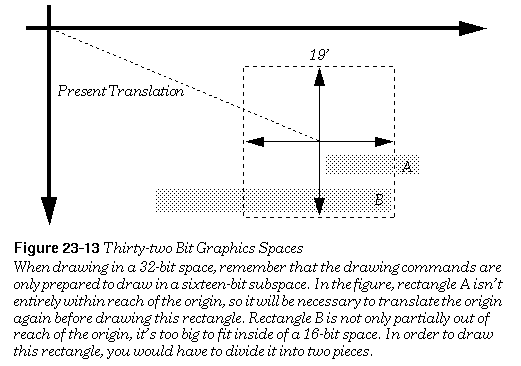
For the most part, 32-bit documents use the same graphics commands as regular 16-bit documents. No single drawing command can cover more than a standard document area; each has been optimized to draw quickly in 16 bits. To draw to the outlying reaches of your document space, apply a special translation that takes 32-bit coordinates, then use normal drawing routines in your new location.
A model for working with 32-bit graphics spaces commonly used with spreadsheets is to break the graphics space into sections. To draw anything, the geode first uses a translation to get to the proper section, then makes the appropriate graphics calls to draw within that section.
If you wish to display this 32-bit coordinate graphics space to the screen, you'll probably want to do so in a 32-bit content.
The standard graphics commands can only draw to one 16 bit space at a time. You will need to translate the coordinate space to choose which 16-bit portion of the 32-bit space you want to draw to. To do so you need to use some special translation functions.
GrApplyTranslationDWord()
corresponds to the
GrApplyTranslation()
function normally used.You can use this routine to make the jumps necessary to access far away portions of the graphics space. Since a coordinate can now be in a much larger area than before, all routines that deal with a point's position have 32-bit equivalents.
GrTransformDWord()
and
GrUntransformDWord()
take the place of
GrTransform()
and
GrUntransform()
.
GrTransformDWFixed()
and
GrUntransformDWFixed()
take the place of
GrTransformWWFixed()
and
GrUntransformWWFixed()
, with two words in the integer part of the number instead of one.
GEOS SDK TechDocs|
| 5.4 Device Coordinates | 5.6 Current Position