
 GEOS SDK TechDocs|
|
GEOS SDK TechDocs|
|  1 Table Objects |
  3 TableClass Instance Data
TableClass
implements a scrolling table. The table should be composed of one or more different columns, and one or more similar rows. Typically, each column would be a different category, and each row would have an entry for every different category.
TableClass
is a subclass of
VisCompClass
. This means that you can group tables together or with other Vis objects. (You can put titles on a scrolling table by grouping two different Table objects together; this is discussed in Table Headings.)
TableClass
supports the following features:
TableClass
sends itself messages to instruct itself to redraw cells as needed; you can intercept these messages if you wish to change how cells are drawn. You can instruct a
Table
object to redraw a range of cells; it will automatically send the appropriate messages to instruct itself to redraw just those cells currently visible on-screen.
TableClass
object intercepts pointer events and sends itself appropriate MSG_TABLE_SELECT messages. Applications can subclass these messages if they want to take special actions when cells are selected. When you instantiate a
Table
object, you specify (by column) what combination of pointer events should act as a selection.
TableClass
can identify start-select, end-select, double-clicking, clicking and holding, and reselecting (i.e. clicking on an already-selected cell).
Table
object sends itself a MSG_TABLE_SELECT message. You can subclass this message if you wish. If you do not subclass this message,
TableClass
can handle the selection in a number of different ways: it can select a single cell, a whole row, a rectangular region, etc. The table also lets you specify how selections should be identified (e.g. drawn in reverse video, surrounded by a solid box, etc.).
Table
object contains more rows than can be shown on-screen, it will automatically scroll as needed. You can instruct the
Table
to scroll up or down by sending it messages. You can also set a flag, instructing the
Table
to scroll automatically when it receives certain pointer events (e.g. when the pointer is dragged off the top or bottom of the table). The
Table
can also be set to scroll when certain keys are pressed.
VisText
object when the user wants to edit the text in a cell. You can send messages to instruct it to create that
VisText
; you can also subclass messages to set the default contents of the
VisText
, or to process the text entered by the user before it's entered in the cell. This is discussed in Editing Cells.
Table
implements a quick-copy, drag-and-drop mechanism. When you activate quick-copy mode, the user can drag a cell to a new location. At this time, the
Table
sends itself a message; you can intercept this message, and take an appropriate action (such as copying the data from the source cell over the destination cell). This is discussed in Dragging and Dropping.
There is one function the
Table
object does
not
perform. It does not
store
the data contained in the cells. When it needs to know the contents of a cell, it requests that information; when the user changes a cell, it informs you. You, however, must store the information yourself.
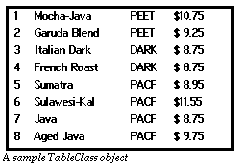
For example, whenever the
Table
object needs to draw a cell, it sends itself
MSG_TABLE_QUERY_DRAW
, specifying which cell needs to be drawn. You should intercept this message; your handler should look up the data stored in that cell, and draw its contents. Similarly, when a user edits a cell, you first tell the
Table
object what the
current
contents of the cell are (by intercepting
MSG_TABLE_START_EDIT_CELL_TEXT
). The
Table
then brings up a
VisText
which contains the current contents of the cell. The user can edit or change this text. When the user is finished, the
Table
object informs the application (via
MSG_TABLE_DONE_EDIT_CELL_TEXT
) what the cell's new contents are. The application should intercept the message and store the new contents.
Since the
Table
refers to its cells by row and column numbers, you may wish to store its data in a GEOS
cell file
. A cell file is a GEOS VM file which uses special structures and routines to organize DB items so they can be accessed by row and column numbers, instead of by group and item handles. For more information about cell files, consult the "Database" chapter of the Concepts book provided with the SDK.
GEOS SDK TechDocs|
| 1 Table Objects | 3 TableClass Instance Data