
 GEOS SDK TechDocs|
|
GEOS SDK TechDocs|
|  4.2 Selecting Cells |
  4.4 Dragging and Dropping
 TableEditCellTextParams, MSG_TABLE_START_EDIT_CELL_TEXT, MSG_TABLE_DONE_EDIT_CELL_TEXT, MSG_TABLE_STOP_CELL_EDIT
The
Table
objects make it easy for the user to edit cells. If the column has TCF_DOUBLE_SELECT enabled, a user can edit a cell in the column just by double-clicking on it. When the user does this, the
Table
object will take the following steps:
MSG_TABLE_START_EDIT_CELL_TEXT
. The default handler causes the
Table
object to create a
VisText
under the TableContent which the user can enter text in.
VisText (by pressing
ENTER
)
, the
Table
object sends itself
MSG_TABLE_DONE_EDIT_CELL_TEXT
, passing along the text that the user entered in the
VisText
. The application should store the text wherever it stores the
Table
's data.
MSG_TABLE_STOP_CELL_EDIT
is generated and the edit is cancelled. (If your program does not wish to cancel the edit under these circumstances, then intercept the message.)
Table
sends itself a
MSG_TABLE_QUERY_DRAW
for the cell which was edited. The application should intercept this message and redraw the cell normally.
Both
MSG_TABLE_START_EDIT_CELL_TEXT
and
MSG_TABLE_DONE_EDIT_CELL_TEXT
use a special structure, the
TableEditCellTextParams
structure; the structure's fields have slightly different meanings for each message. This structure has the following definition:
typedef struct {
	TableCellRange			TECT_cells;
	MemHandle			TECT_text;
	word			TECT_length;
} TableEditCellTextParams;
_cells
TableCellRange
structure (described on A TableCellRange structure is used to specify a range of cells. It has the following definition:), specifying what cells have been selected for editing. If a single cell has been selected for editing, TCR
_start
will be the same as TCR
_end
.
_text
_length
_text
, or zero if the string is null-terminated.
MSG_TABLE_START_EDIT_CELL_TEXT
creates a VisText object (within the TableContent and over the cell to be edited) to allow the user to edit the cell's text. This message passes a set of
TableEditCellTextParams
containing the cell range being edited (TECT
_cells
) and the initial text to display to the user (if any) in TECT
_text
and TECT
_length
. This text object, which may be referenced via
TI_textObj
, can persist between edits. Thus, if you change its instance data, be aware that these changes may or may not linger in future edits. You may wish to update any changes in your
MSG_TABLE_START_EDIT_CELL_TEXT
handler.
The default handler clears both TECT
_text
and TECT
_length
. Your application may subclass the message, and fill in these fields with default text for the
VisText
(e.g., you may want to retrieve the text currently in the specified cell and display that to be edited). If TECT
_text
contains a null handle, the
VisText
will start out blank.
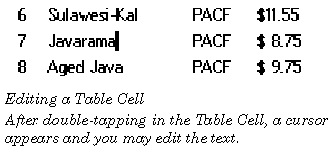
To provide this default text, allocate a global memory block, copy the string into the beginning of the block, and put the block's handle in TECT
_text
. (You should not store anything else in this block, because the block will be freed by the handler for MSG_TABLE_DONE_EDIT_CELL_TEXT.) If a valid handle was not passed in TECT
_text
, it allocates a global memory block for the
VisText
to write to; otherwise, the
VisText
will simply write to the block specified in TECT
_text
(overwriting the original text).
Code Display 5-3 Handling MSG_TABLE_START_EDIT_CELL_TEXT
@method CoffeeTableClass, MSG_TABLE_START_EDIT_CELL_TEXT
{
    char *cellData, *textPtr;
    word cArrayIndex, size;
    cArrayIndex = (params.TECT_cells.TCR_start.TCL_row * TABLE_COLS) +
		params.TECT_cells.TCR_start.TCL_column;
/* The superclass will free this block that we allocate here. */
    params.TECT_text = MemAlloc(CELL_DATA_LENGTH, HF_SWAPABLE, HAF_LOCK);
    textPtr = MemDeref(params.TECT_text);
/* Retrieve the current data from the cell and stuff it in the memory block. */
    pself = ObjDerefVis(oself);
    MemLock(OptrToHandle(pself->CTI_chunkArray);
    cellData = ChunkArrayElementToPtr((pself->CTI_chunkArray),
				cArrayIndex, &size);
    strcpy(textPtr, cellData);
MemUnlock(OptrToHandle(pself->CTI_chunkArray));
params.TECT_length = 0; /* Zero indicates null-termination. */
    @callsuper();
}
When the user has finished entering text, the
VisText
object sends the Table object MSG_TABLE_DONE_EDIT_CELL_TEXT. This message takes one argument, a
TableEditCellTextParams
structure. The TECT
_text
field will contain the handle of a global memory block, containing the text the user has entered.The application should intercept the message, so it can store the new text; afterwards, it should call the default handler, which will free the memory block specified by TECT
_text
and perform other bookkeeping chores. The Table object will automatically send an appropriate
MSG_TABLE_QUERY_DRAW
, so the cell will be redrawn with the new contents.
Note that the Table object supports allowing the user to edit several cells at once. If you choose to allow this, you must decide what the functionality is; that is, in your handler for MSG_TABLE_START_EDIT_CELL_TEXT, you must decide what cell's text to display in the
VisText
(e.g. the first cell's text, or a composite of all the selected cells's text); and in your handler for MSG_TABLE_DONE_EDIT_CELL_TEXT, you must decide where and how to store the entered text (e.g. whether to overwrite all the edited cells with the same text, divide the entered text amongst the cells, etc.).
Code Display 5-4 Handling MSG_TABLE_DONE_EDIT_CELL_TEXT
@method CoffeeTableClass, MSG_TABLE_DONE_EDIT_CELL_TEXT
{
    char *cellData, *textPtr;
    word cArrayIndex, size;
    cArrayIndex = (params.TECT_cells.TCR_start.TCL_row * TABLE_COLS) +
		params.TECT_cells.TCR_start.TCL_column;
textPtr = MemLock(params.TECT_text);
/* Make sure we're null terminated ... */
textPtr[CELL_DATA_LENGTH -1]; = (char)0;
/* Lock down the cell and copy the string to it. */
MemLock(OptrToHandle(pself->CTI_chunkArray));
    cellData = ChunkArrayElementToPtr((pself->CTI_chunkArray),
		cArrayIndex, &size);
    strcpy(cellData, textPtr);
    MemUnlock(OptrToHandle(pself->CTI_chunkArray));
    @callsuper();
}
void	MSG_TABLE_START_EDIT_CELL_TEXT(
        TableEditCellTextParams			params);
The
Table
object sends itself this message when the user starts editing a cell. The default handler brings up a
VisText
for the user to enter text. You should intercept this message, so you can look up and provide the cell's current contents; that way, the contents will be put in the
VisText
for the user to edit.
Source: Any
Table
object.
Destination: The
Table
sends this message to itself.
Parameters:
params.
TECT
_cells
This field specifies the cell or cells the user is editing.
params.
TECT
_text
VisText
when it is brought up. When this message is sent,
params.
TECT
_text
contains a null handle; your subclass's handler may allocate a global memory block, copy the text into that block, and write the handle here. (Note that the
VisText
will write to the block you specify, so it should not contain any other data.)
params.
TECT
_length
params.
TECT
_text
. If this field is zero, the string is null-terminated.
Return: Nothing. (If
params.
TECT
_text
contained a null handle, the default handler will allocate a block.)
Structures:
TableEditCellTextParams
(see Both MSG_TABLE_START_EDIT_CELL_TEXT and MSG_TABLE_DONE_EDIT_CELL_TEXT use a special structure, the TableEditCellTextParams structure; the structure's fields have slightly different meanings for each message. This structure has the following defi).
Interception: You should intercept this message to provide the text for the
VisText
to present for editing (which will usually be the current contents of the cell being edited). After this, you should call the default handler with
@callsuper
, so the
VisText
can be created.
Warnings: If you put a memory handle in
params.
TECT
_text
, that block will be written to by the
VisText
, and freed by the handler for MSG_TABLE_DONE_EDIT_CELL_TEXT; so make sure it doesn't contain any other data.
void	MSG_TABLE_DONE_EDIT_CELL_TEXT(
        TableEditCellTextParams				params);
The
VisText
object sends this message to the Table object after the user has finished entering data. The application should intercept this message to copy data into its storage location; you should also make sure to call the default handler, which will remove the
VisText
and perform other bookkeeping chores.
Source: This message is sent by a
VisText
object used by the
Table
for text editing.
Destination: The
VisText
sends this message to its parent
Table
.
Parameters:
params.
TECT
_cells
This field specifies the cell or cells the user has edited.
params.
TECT
_text
VisText
. The default handler will free this block.
params.
TECT
_length
params.
TECT
_text
. If this field is zero, the string is null-terminated.
Return: Nothing. (The default handler will free the block specified by
params.
TECT
_text
.)
Structures:
TableEditCellTextParams
(see Both MSG_TABLE_START_EDIT_CELL_TEXT and MSG_TABLE_DONE_EDIT_CELL_TEXT use a special structure, the TableEditCellTextParams structure; the structure's fields have slightly different meanings for each message. This structure has the following defi).
Interception: You should intercept this message, so you can copy the new data into your application's storage. Afterwards, you should make sure to call the default handler with
@callsuper
.
void MSG_TABLE_STOP_EDIT_CELL_TEXT();
The
VisText
object sends this message to the Table if the user clicks outside the cell while editing data. This cancels the edit: the Table returns to its normal mode and the user's edits are discarded.
Source: This message is sent by a
VisText
object used by the
Table
for text editing.
Destination: The
VisText
sends this message to its parent
Table
.
Parameters: None.
Return: Nothing.
Interception: If your program wants to treat a tap outside the edited cell as a signal that the edit is finished, not cancelled, then get the (abandoned) text that the user was editing from the VisText child of the Table. The chunk handle of this VisText child is stored in TI_textObj. You can build an optr to the VisText by using:
textObj = ConstructOptr(OptrToHandle(@YourTable),
pself->TI_textObj);
To retrieve the text, use:
@call textObj::MSG_VIS_TEXT_GET_ALL_PTR(buffer);
where "buffer" has been declared as "char buffer[]".
Once you've retrieved the text, the remainder of your method should just save away this data in whatever data structure you've built to hold your table's data -- just like in the method for
MSG_TABLE_DONE_EDIT_CELL_TEXT
.
GEOS SDK TechDocs|
| 4.2 Selecting Cells | 4.4 Dragging and Dropping