
 GEOS SDK TechDocs|
|
GEOS SDK TechDocs|
|  4.3 Editing Cells |
  4.5 Custom Scrolling Behavior
 TableDragDropCompleteParams, TableDragDropCell, TableDragDropFlags, MSG_TABLE_DRAG_DROP_COMPLETE
The
Table
object supports the standard GEOS drag-drop functionality. It allows the user to select one or more cells, then drag their contents to other cells in the
Table
. However, the
Table
object does not actually keep track of the contents of the cells. Instead, it detects which cells the user dragged and where the user dropped them, and it notifies the application with
MSG_TABLE_DRAG_DROP_COMPLETE
. The application should intercept this message and use this information to copy data to its appropriate places in its storage.
The
Table
is put in drag-and-drop mode when the
TableFlags
bit TF_INTERNAL_DRAG_DROP is set (for example through the sending of
MSG_TABLE_SET_FLAGS
). If the Table's column flags contain TCF_HOLD_SELECT, holding for the specified period of time to initiate a "hold" will also set the TF_INTERNAL_DRAG_DROP flag. When the
Table
is in drag-and-drop mode, the user can copy a cell's contents to another cell by clicking on one cell, dragging the pointer to the other cell, and releasing. If the
TableFlags
bit TF_EXIT_DRAG_DROP_UPON_COMPLETION is set, the
Table
will automatically clear TF_INTERNAL_DRAG_DROP after every drag-and-drop.
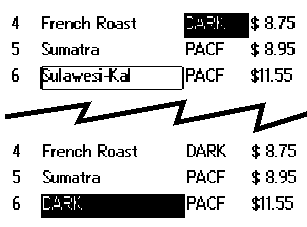
The
Table
object sends
MSG_TABLE_DRAG_DROP_COMPLETE
when the user finishes a drag-and-drop operation. This message passes one argument, a
TableDragDropCompleteParams
structure. This structure has the following definition:
typedef struct {
	TableDragDropCell				TDDCP_dragDrop;
	TableDragDropFlags				TDDCP_flags;
} TableDragDropCompleteParams;
_dragDrop
TableDragDropCell
structure is described below.
_flags
TableDragDropFlags
flags, described below.
The cells being dragged, and the location to which they are being dropped, are specified with a
TableDragDropCell
structure. This structure has the following definition:
typedef struct {
	TableCellRange			TDDC_from;
	TableCellRange			TDDC_to;
} TableDragDropCell;
_from
_to
_from
is being dropped.
When
MSG_TABLE_DRAG_DROP_COMPLETE
is sent, the TDDCP
_flags
field of the passed
TableDragDropCompleteParams
is blank. If you intercept this message, you can change this field, setting any
TableDragDropFlags
bits in this field. Currently, only one flag is defined:
Table
will redraw all visible cells after a drag-drop operation. If it is set, it will not redraw any cells. (You may wish to set this flag, then force redrawing of a few affected cells with an appropriate
MSG_TABLE_REDRAW...
message; these messages are described on The Table automatically sends MSG_TABLE_QUERY_DRAW when it knows a part of the Table may be inaccurate, e.g. when the user has edited a cell. You can also instruct the Table to redraw part or all of itself by sending it one of the MSG_TABLE_REDR.)You should intercept the message, and perform any appropriate data operations, e.g. copying the data from the "dragged" cell to the location where it was "dropped".
If the TF_EXIT_DRAG_DROP_UPON_COMPLETION flag is set, drag and drop mode will be exited upon receipt of
MSG_TABLE_DRAG_DROP_COMPLETE
. Otherwise, you will need to determine when you wish to exit drag and drop mode and clear the TF_INTERNAL_DRAG_DROP flag manually by sending the Table
MSG_TABLE_SET_FLAGS
. (You might wish to do this if you want to drag and drop to multiple locations, for example.) Because you are modifying an internal flag in this process, this approach is highly discouraged.
Code Display 5-5 Implementing Drag and Drop Mode
/* This message is sent to the Table whenever it completes a drag and drop
 * operation (by releasing the pen). In your handler, determine the starting and
 * ending point of the operation and copy the data from one location to the other.
 */
@method CoffeeTableClass, MSG_TABLE_DRAG_DROP_COMPLETE
{
    char *fromData, *toData;
    word fromIndex, toIndex, size;
    /* We are storing our data in a chunk array (not shown). We obtain a
     * linear index into this data based on the cell row and column. */
    fromIndex =
	(cellFromTo.TDDCP_dragDrop.TDDC_from.TCR_start.TCL_row * TABLE_COLS) +
	cellFromTo.TDDCP_dragDrop.TDDC_from.TCR_start.TCL_column;
    toIndex =
	(cellFromTo.TDDCP_dragDrop.TDDC_to.TCR_start.TCL_row * TABLE_COLS) +
	cellFromTo.TDDCP_dragDrop.TDDC_to.TCR_start.TCL_column;
/* Check if this drag and drop is from within the same Table. */
if (pself->TI_tableFlags & TF_INTERNAL_DRAG_DROP) {
MemLock(OptrToHandle(pself->CTI_chunkArray);
	fromData = ChunkArrayElementToPtr((pself->CTI_chunkArray),
					fromIndex, &size);
	toData = ChunkArrayElementToPtr((pself->CTI_chunkArray),
					toIndex, &Size);
    	/* Copy the actual data. *
	strcpy(toData, fromData);
	MemUnlock(OptrToHandle(pself->CTI_chunkArray));
    }
    /* Call the superclass. This will also exit the Table from drag and drop mode
     * if the TF_EXIT_DRAG_DROP_UPON_COMPLETION flag is set. */
    @callsuper();
}
void	MSG_TABLE_DRAG_DROP_COMPLETE(
        TableDragDropCompleteParams					cellFromTo);
The
Table
object sends this message to itself when the user has finished performing a drag-and-drop operation. Application writers who wish to perform operations on the data being dragged and dropped must intercept this message.
Source: A
TableClass
object.
Destination: The
Table
object sends this message to itself.
Parameters:
cellFromTo.
TDDCP
_dragDrop
This field specifies what cells are being dragged, and where they are being dropped.
cellFromTo.TDDCP_flagsReturn: Nothing.
Structures: The arguments are passed in a
TableDragDropCompleteParams
structure (described on The Table object sends MSG_TABLE_DRAG_DROP_COMPLETE when the user finishes a drag-and-drop operation. This message passes one argument, a TableDragDropCompleteParams structure. This structure has the following definition:).
Interception: Must intercept to perform data operations necessary to implement the drag-and-drop. Afterwards, make sure to call the default handler with
@callsuper
. The default handler will cause the entire visible portion of the
Table
to be redrawn, unless you have set the TDDF_DONT_RESCAN_CELLS bit in
cellFromTo.TDDCP_flags
.
GEOS SDK TechDocs|
| 4.3 Editing Cells | 4.5 Custom Scrolling Behavior