
 GEOS SDK TechDocs|
|
GEOS SDK TechDocs|
|  4.1 Drawing Cells |
  4.3 Editing Cells
 TableCellLocation, CellRange, MSG_TABLE_SELECT, MSG_TABLE_GET_CURRENT_SELECTION, MSG_TABLE_SET_CURRENT_SELECTION. MSG_TABLE_SET_ROW_RANGE_SELECTION
You can configure under what circumstances a
Table
object will select a cell by setting the
TableColumnFlags
for the various columns in the table. The
TableColumnFlags
determine what will constitute a "selection event", and what cells will be selected. When a selection event occurs, the
Table
object will send itself MSG_TABLE_SELECT. This message passes two arguments:
TableCellLocation
structure (described below). This structure specifies which cell was selected. If more than one cell was selected, this will specify the cell where the selection action
began
.
TableColumnFlags
record. This record specifies two things. It specifies what pointer event or events caused the selection; and it specifies, in its TCF_TRIT field, which cells should be highlighted as selected.
A
TableCellLocation
structure is used to specify a cell within the
Table
. It has the following definition:
typedef struct {
	word	TCL_row;
	word	TCL_column;
} TableCellLocation;
_row
_column
The default handler for this message causes an area of the table to be highlighted. The area is determined by the TCF_TRIT field of the
TableColumnFlags
record passed with the message. If you wish, you may intercept the message before it is handled by the default handler, and change the TCF_TRIT field in the passed
TableColumnFlags
; this will change which cells will be highlighted by the default handler. For example, if you change the TCF_TRIT field to contain TRIT_NONE, then the default handler will not highlight any rows.
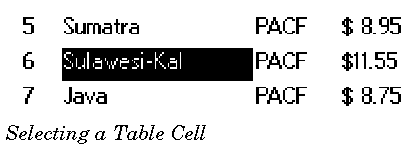
You can find out what cells, if any, are currently selected by sending MSG_TABLE_GET_CURRENT_SELECTION to the
Table
object. This message takes one argument, a pointer to a
TableCellRange
structure. The handler will fill in this structure with the currently selected range.
A
TableCellRange
structure is used to specify a range of cells. It has the following definition:
typedef struct {
	TableCellLocation				TCR_start;
	TableCellLocation				TCR_end;
} TableCellRange;
_start
TableCellLocation
specifies the first cell in the selected range. (The
TableCellLocation
structure is described on A TableCellLocation structure is used to specify a cell within the Table. It has the following definition:.)
_end
TableCellLocation
specifies the last cell in the selected range. (Note that this cell may be higher up in the
Table
then TCR
_start
; the same range is defined, whichever order TCR
_start
and TCR
_end
appear in.)
Note that a
TableCellRange
forms a rectangle. You can change the selected cells at any time by sending
MSG_TABLE_SET_CURRENT_SELECTION
. This message is passed one argument, a
TableCellRange
structure; that structure specifies what the current selection should be. The
Table
object responds by changing the current selection but does not send a
MSG_TABLE_SELECT
. To cancel the current selection (and leave the
Table
with nothing selected), send
MSG_TABLE_SET_CURRENT_SELECTION
, and put the constant T_NONE_SELECTED in the TCR
_start.
TCL
_column
field of the passed
TableCellRange
structure. (If you do this, the other fields of the
TableCellRange
will be ignored.) Again,
MSG_TABLE_SELECT
is not sent in this case.
void	MSG_TABLE_SELECT(
        TableCellLocation		location,
        TableColumnFlags		tableColumnFlags);
The
Table
object sends this message to itself when the user selects one or more cells with a pointer object. (I.e. this message is generated through use of the pointer for Table selection, not when the selection changes through other means.) The
TableColumnFlags
of the various columns determine whether a particular mouse action is interpreted as a selection. If it is, the
Table
object sends itself this message, instructing itself to highlight the appropriate cells.
Source: A
TableClass
object.
Destination: The
Table
object sends this message to itself.
Parameters:
location
This is the selected cell; that is, the cell in which the pointer was when the column's selection criteria were met.
tableColumnFlags
TableColumnFlags
. The flags specify two things: They specify what criteria were used to determine that a selection had happened; and they specify (in the TCF_TRIT field) which cells should be highlighted.Return: Nothing.
Structures:
TableCellLocation
(see A TableCellLocation structure is used to specify a cell within the Table. It has the following definition:) and
TableColumnFlags
(see The TableColumnFlags record has the following flags:).
Interception: You may intercept this. If you intercept this message, you can change which cells will be highlighted by changing the
tableColumnFlags.
TCF_TRIT field.
void	MSG_TABLE_GET_CURRENT_SELECTION(
        TableCellRange *		cellRange);
This message retrieves what cells are currently selected within a Table object
Source: Unrestricted.
Destination: Any
TableClass
object.
Parameters:
cellRange
A pointer to a
TableCellRange
structure.
Return:
*cellRange
will specify the first and last selected cells.
Structures:
TableCellRange
(described on A TableCellRange structure is used to specify a range of cells. It has the following definition:).
void	MSG_TABLE_SET_CURRENT_SELECTION(
        TableCellRange		cellRange);
This message changes what cells are currently selected within a Table object.
Source: Unrestricted.
Destination: Any
TableClass
object.
Parameters:
cellRange
A pointer to a
TableCellRange
structure, specifying what cells should be selected. (If
cellRange.
TCR
_start.
TCL
_column
= T_NONE_SELECTED, no cells will be selected.)
Return: Nothing.
Structures:
TableCellRange
(described on A TableCellRange structure is used to specify a range of cells. It has the following definition:).
GEOS SDK TechDocs|
| 4.1 Drawing Cells | 4.3 Editing Cells